
Know what you're buying before it hits your cart.
Most nutrition decisions happen in the grocery store, not at the dinner table. Nutrify's Shop Mode lets you scan any product and see its full nutrition label before you commit to it.
The short answer
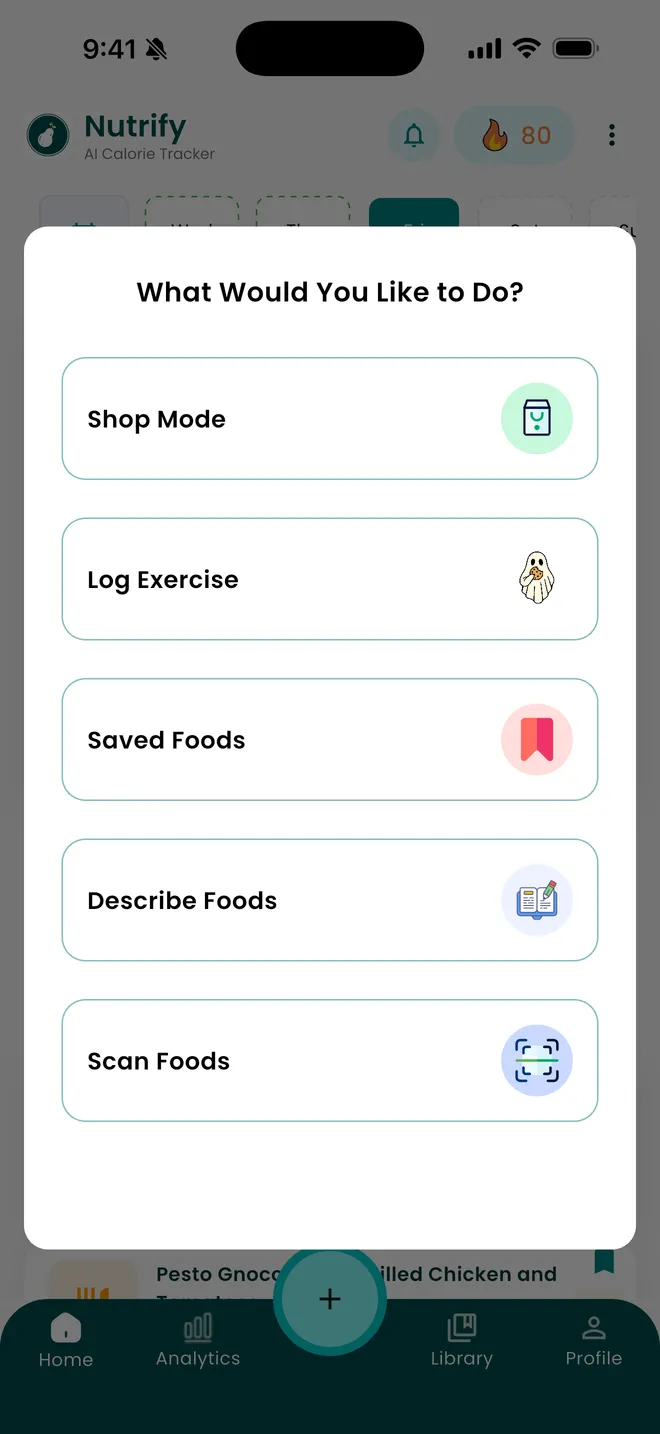
Shop Mode is a scanning mode you open while you are standing in the aisle. Point the camera at a packaged product and Nutrify shows its nutrition breakdown before it goes in the trolley, and you can scan a second product and compare the two on the same footing rather than squinting at two labels with different serving sizes. It is free on iOS and Android and uses the same product data as normal barcode logging.
Why it matters
The grocery store is where your nutrition is decided, not the kitchen. What you bring home is what you'll eat. But comparing two products on a supermarket shelf means flipping packages, squinting at small print, and trying to mentally compare serving sizes that don't match. Most people give up and go with what looks healthiest, which is often driven by marketing rather than actual nutrition. Having a scanner in your pocket that gives you an instant, comparable breakdown changes every shopping trip from guesswork into informed decisions.
What is a grocery scanning app?
A grocery scanning app reads the barcode on a packaged product and returns its nutrition information on your phone, so you can judge a product before you buy it rather than after you have eaten it. The category exists because a nutrition label is technically public information and practically unusable in a shop: the print is small, the panel is on the back, and two competing products routinely quote their numbers per different serving sizes so the figures on the front cannot be compared directly. A scanner solves the mechanical part of that. What separates one app from another is database coverage in the country you actually shop in, how quickly a scan resolves, and whether the numbers are normalised enough that a comparison means anything.
How it works in Nutrify
Simple enough to actually do every day
Open Shop Mode
Switch to Shop Mode in Nutrify when you arrive at the store.
Scan any product
Point the camera at any barcode and get the full nutrition label in under a second.
Add to your plan
Save products to your diary or grocery list and keep shopping.
Log any food, any way
Scan a barcode, speak it, or check products in store
Why Nutrify specifically
Built for this, not bolted on
Scan before you buy
Point your camera at any barcode and see the full nutrition label before the product goes in your cart.
Compare two products side by side
Scan both options and compare them on protein, sugar, sodium, whatever matters most to your goals.
Pre-log as you shop
Add products to your food diary from the store so your meals are already logged before you get home.


Serving sizes are the reason two labels do not compare
The single most misleading thing on a package is the serving size, because the manufacturer chooses it. One granola quotes 45g, the one beside it quotes 30g, and the second looks lower in sugar while being worse per mouthful. Half a pizza and a third of a pizza are both real serving sizes printed on real boxes. Scanning both products puts the numbers in one consistent view instead of asking you to do arithmetic while holding two boxes and a basket. This is the whole reason a scanner beats reading the label: not that the label is secret, but that the label is designed to be read alone rather than against a competitor.
The decision is made in the shop, not the kitchen
What you cook this week is mostly decided by what you carried home on Saturday. Once a product is in the cupboard it gets eaten, and no amount of careful logging afterwards changes what is available to eat. That makes the aisle the highest leverage place to check a number and the place almost nobody checks one, because checking means unpacking the phone, finding an app and searching a database while someone waits behind you with a trolley. Shop Mode exists to make that check take a second. It does not tell you what to buy. It puts the information in front of you at the only moment where the information can still change the outcome.
Front of pack is marketing, back of pack is the product
High protein, no added sugar, made with wholegrain and light are all claims with either a narrow legal definition or none at all, and they are printed in the largest type on the package. None of them tell you the protein per 100g, how much of the sugar is there regardless of what was added, or how much sodium comes with the wholegrain. Scanning skips the front of the pack entirely and goes to the panel that the claims are derived from. Reasonable people still buy the product after looking. The point is that they buy it knowing the number, rather than buying an adjective.
What a scanner cannot tell you
Barcode databases are built from a mix of manufacturer data and contributions, so coverage is uneven and it thins out on regional brands, supermarket own labels and anything recently reformulated. A recipe change usually keeps the same barcode, which means a stale entry can look confidently wrong rather than obviously missing. If a scan returns nothing, or returns something that does not match the panel in your hand, the panel is right and the entry needs correcting. Treat a scanner as much faster than typing rather than as infallible, and check the number against the package the first time you buy something you plan to eat regularly.
A product you scanned in the shop is a product you can log at home
Shop Mode is not a separate database. It reads the same product records that the barcode scanner uses when you log a meal, so anything you looked at in the aisle is already recognised when the packet is open on the counter three days later. That matters for the boring, repeated part of tracking: most people buy roughly the same forty products, and once those are resolved correctly the daily logging cost of packaged food drops to about a second each. The comparison you did in the shop is doing double duty as the setup for the diary.
What users say
Reviews from the App Store
I've been through at least 6 food trackers and this one is the keeper. Just started GLP-1, you find out really quickly that you need to track your nutrients, and this app tracks everything I need: protein, fiber, carbs, calories, weight progress. It specifically supports a GLP-1 diet nutrient focus (gives you the choice of several other diets too). The interface is super easy, take a photo of your food, the AI nutrients estimates are very accurate. And important for GLP-1 users, it lets you adjust your meal based on actual consumption ( because you know you can never finish your whole meal).
Nutrify has been such a huge part of me getting my life back on track. I'm on a weight‑loss and diabetes journey, and for many I felt like I didn't having any direction and hoping for the best. This app finally gave me something solid to hold onto. I LOVE the analytics! It actually helps me understand my food, my numbers, and my habits in a way that makes sense to me. I can see what's helping, what is not, and what I need to adjust without feeling judged or self-conscious about it.
I am an advanced user of intermittent fasting and have tried practically all serious applications of its kind. I tried Nutrify for a while and it seems to me that they have done an excellent job and a fairly complete vision of what the habits mean that we all seek to improve our nutrition. They are doing better than many veteran Apps like LoseIt and Cronometer!
FAQ
Grocery Shop Mode questions, answered
Yes. Nutrify has a Shop Mode you open in the store: point the camera at a barcode and the product breakdown comes back on screen before you buy. It is free on iOS and Android. The practical thing to check before committing to any grocery scanner is whether it recognises the brands sold where you actually shop, because coverage varies far more by country than by app.
Scan both. The problem with reading the two labels is that the manufacturers pick their own serving sizes, so a product can look lower in sugar simply by quoting a smaller portion. Scanning puts both products in one consistent view so you are comparing like with like on protein, sugar, sodium or whatever matters for your goal, rather than doing arithmetic in the aisle.
It happens, most often with supermarket own labels and regional brands. When a product does not resolve, you can add it from the label rather than abandoning the scan, and the entry is then there for you next time. If a scan returns numbers that do not match the panel in your hand, trust the panel: manufacturers reformulate products without changing the barcode, so an old entry can be wrong rather than absent.
Only if you choose to add it. Shop Mode is for looking at a product before you buy it, so scanning by itself is a lookup rather than a log. Nothing lands in your day unless you put it there, which matters because you will scan several things you decide against.
Nutrify is free to download on iOS and Android, and Shop Mode is covered by the same subscription as everything else rather than sold as an extra. Every feature is open during the 7-day trial; after that it is a paid app, and you can cancel at any time.
Resolving a barcode means looking a product up, so a scan needs a connection. Supermarket mobile coverage is patchy in the middle of a large store, which is worth knowing before you rely on it for a full shop. Store wifi, where it exists, is usually more reliable than a signal three aisles deep.
It can tell you what is in it, which is the part the package makes hard. Whether that is a good fit is a judgement that depends on the rest of your day and your goals, and Nutrify shows the breakdown rather than issuing a verdict in the aisle. Once a food is logged, the health score and nutrient breakdown put it in the context of everything else you ate.
Same underlying product data, different intent. The barcode scanner is for logging something you are about to eat, so it takes you to serving size and your diary. Shop Mode is for deciding, so it is built around reading the breakdown and putting two products next to each other without any of it touching your day.
And you also get
Grocery Shop Mode is one piece of it.
Every Nutrify user gets the full app: AI food recognition, analytics, health integrations, and everything below.
Barcode Scanner
Point your camera at any packaged food and get the full nutrition label in under a second. No searching, no typing, no estimating. Just scan and log.
Meal Logging
Most food diary apps fail because logging a meal takes longer than eating it. Nutrify flips that: photo, voice, barcode, or text, your meal is logged before you put down your fork.
Ingredient Breakdown
Knowing your meal has 600 calories is one thing. Knowing it's the dressing, not the chicken, that's adding 300 of them, that's the information that actually changes what you order next time.
Health Score
Hitting your calorie target doesn't mean you're eating well. Nutrify's Health Score looks at your full diet (fiber, protein, sugar, micronutrients) and gives you an honest number.
Nutrition Analytics
Nutrify's analytics show your nutrition trends over days, weeks, and months, so you can see what's actually working, what's not, and where the gaps are.
Keep reading
Ready to try Grocery Shop Mode?
Free to download. Every feature free for 7 days, and you can cancel any time.