
The meal logging app that doesn't get in your way.
Most food diary apps fail because logging a meal takes longer than eating it. Nutrify flips that: photo, voice, barcode, or text, your meal is logged before you put down your fork.
The short answer
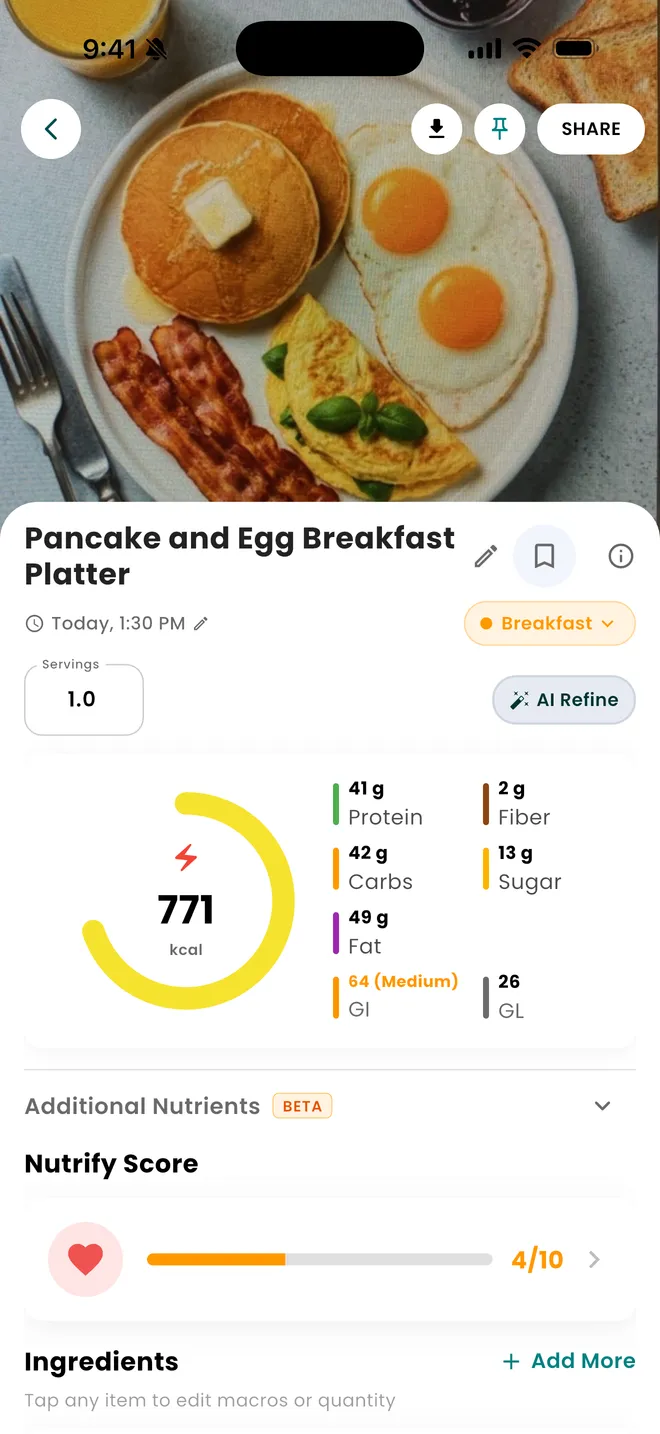
Nutrify logs a meal six ways: photograph the plate, scan a barcode, say what you ate, type it, pick something from your saved foods, or scan a product in Shop Mode while you are still in the aisle. All six land on the same food detail screen, with calories, protein, carbs, fat, fibre and sugar, glycemic index and load, a Nutrify Score out of 10, and an ingredient list you can edit line by line. It is free to download on iOS and Android, with a 7-day free trial of the paid tier.
Why it matters
Consistent meal logging is the single most effective tool for improving what you eat, but only if you actually do it. Research consistently shows that people who log their food lose more weight and maintain it longer than those who don't. The problem isn't motivation. It's friction. Every extra tap, every failed database search, every "I'll log it later" is a log that never happens. The best meal logging app is the one you'll actually use every day, and that means it has to be fast, forgiving, and flexible enough to handle how you actually eat.
What is a meal logging app?
A meal logging app is a food diary that records what you eat and turns it into numbers: calories first, then protein, carbohydrate and fat, and usually a longer list of nutrients underneath. The older generation of these apps was built around a searchable database, so logging meant naming your food and picking the closest match from a list of strangers' entries. That search step is where most people quit. The newer generation adds recognition, so a camera can read a plate, a scanner can read a barcode, and a microphone can take a spoken sentence. What has not changed is the point of the exercise. A log is only useful if it is roughly complete, and a roughly complete record of an ordinary week tells you far more about how you eat than a perfect record of the three days you felt like tracking.
How it works in Nutrify
Simple enough to actually do every day
Open Nutrify
Tap the log button from your home screen or widget, it's always one tap away.
Add your meal any way you want
Take a photo, scan a barcode, say what you ate, or search by name. All four methods are equally fast.
See the full breakdown
Calories, macros, and 37 nutrients logged instantly. No waiting, no manual entry.
Snap a meal, see the calories
AI logs your calories and protein in seconds
Why Nutrify specifically
Built for this, not bolted on
Four ways to log, zero excuses
Snap a photo, scan a barcode, speak it, or type it. Nutrify picks the fastest path for the moment you're in.
AI fills in the gaps
Not sure about portion size? AI estimates from visual cues and gives you a realistic number, not a wild guess that throws off your whole day.
Everything in one log
Meals, snacks, drinks, supplements, your full day in one place. No juggling between apps.


The bottleneck was never the database, it was the search box
Every mainstream food diary has had a large database for over a decade, so raw coverage stopped being the differentiator a long time ago. The cost is in the matching. You type "chicken curry", get hundreds of entries, and have to judge which stranger's version resembles the bowl in front of you. That judgement is slow, you repeat it at every meal, and it is where tracking habits die. Recognition-first logging inverts the order. You supply the meal in whatever form is nearest to hand, and the app proposes a breakdown you correct, rather than a list you rank. You are still making a judgement, but you are fixing one estimate instead of sorting through candidates, and that is seconds rather than minutes.
Six ways in, one screen out
Nutrify has six entry points: an AI photo scan, a barcode scan, a spoken description, a typed description, your saved foods, and Shop Mode for scanning products in a store. They exist because the fastest route changes with the situation. A packaged snack is a barcode. A restaurant plate is a photo. Something you are eating one-handed is voice. What matters is that all six end on the same food detail screen, with the same fields and the same edit controls, so there is no separate flow to learn per path. A meal logged by voice on Tuesday sits in your history next to one photographed on Wednesday with nothing to tell them apart.
An AI estimate you are allowed to argue with
Anything that reads a plate is estimating, and an estimate presented as a locked number is worse than an honest one you can correct. On the food detail screen the meal is split into ingredients, each carrying its own quantity and its own macros, and each editable on its own. If the reading is off in one place, you fix that line and the totals follow. If the whole thing is wrong, the AI Refine button takes a plain-language correction and redoes the estimate. There is also a thumbs up and thumbs down prompt on accuracy, which exists to catch the cases where the model is confidently wrong rather than obviously wrong.
Most people eat a rotation, so the second log should cost less than the first
Diet variety is narrower than it feels, and breakfast in particular tends to repeat for weeks at a time. An app that charges you full price for the same meal every morning is making you do avoidable work. Saved foods and the library exist for that: anything you eat regularly gets saved once and logged with a tap afterwards, portion already set, and recipes you have imported sit in the same place. This is also the honest explanation for why day one of tracking feels slow and day ten does not. You are not getting better at the app, you are building a rotation that is already inside it.
Precision is not evenly available, and pretending otherwise is the problem
A barcode returns a manufacturer's declared label. A photo returns a model's estimate of a portion it can only see from one angle. Those are not the same quality of number, and it helps to know which one you are looking at. The practical split is simple: scan packaged food, photograph or describe cooked food, and build a recipe ingredient by ingredient when it is something you will eat many times. Chasing exactness on a home-made stew is usually wasted effort, because consistency across a week moves your average more than accuracy on any single plate. A log that is roughly right every day beats one that is exact on Monday and empty by Thursday.
What users say
Reviews from the App Store
I've been through at least 6 food trackers and this one is the keeper. Just started GLP-1, you find out really quickly that you need to track your nutrients, and this app tracks everything I need: protein, fiber, carbs, calories, weight progress. It specifically supports a GLP-1 diet nutrient focus (gives you the choice of several other diets too). The interface is super easy, take a photo of your food, the AI nutrients estimates are very accurate. And important for GLP-1 users, it lets you adjust your meal based on actual consumption ( because you know you can never finish your whole meal).
Nutrify has been such a huge part of me getting my life back on track. I'm on a weight‑loss and diabetes journey, and for many I felt like I didn't having any direction and hoping for the best. This app finally gave me something solid to hold onto. I LOVE the analytics! It actually helps me understand my food, my numbers, and my habits in a way that makes sense to me. I can see what's helping, what is not, and what I need to adjust without feeling judged or self-conscious about it.
• If you are doing intermittent fasting or just trying to eat decently, this app is for you. • If you want to take a pic of your meal, instead of looking up every part of it, this app is for you. • If you want to track your exercise and measurements progress, this app is for you. • If you want to track your water intake, this app is for you. Yes, Nutrify Tracker does all of those things and more.
FAQ
Meal Logging questions, answered
The one you will still be opening in a month, which in practice means the one with the least friction at the moment you eat. Look for more than one way in, an entry you can edit rather than accept, a saved-foods list for meals you repeat, and a breakdown detailed enough to act on. Nutrify offers six logging paths and is free to download on iOS and Android, currently rated 4.7 from 60 App Store ratings.
Yes. Photograph the plate and Nutrify identifies the components, estimates portions and produces calories and macros with an ingredient list attached. Each ingredient keeps its own quantity and macros, so if the portion of rice looks too generous you adjust that one line. There is also an AI Refine button if the whole reading needs redoing from a description you type.
Describe or photograph it and correct the estimate rather than measuring it. Scales help for things you eat constantly, like oats or chicken breast, because one weighing teaches you what that portion looks like for the next hundred times. For everything else, an estimate that lands within a reasonable range every day is more useful than an exact figure you only produce twice a week.
Nutrify is free to download on both iOS and Android, and comes with a 7-day free trial of the paid tier that you can cancel at any time. Most tracking apps in this category follow a similar pattern, with basic logging available at no cost and AI recognition, deeper nutrient data or analytics behind a subscription.
A barcode scan is close to instant because it is a lookup. A photo or a spoken description takes a few seconds while the estimate is produced, plus however long you spend correcting it. Anything already in your saved foods is a single tap. The slow path in any app is the one where you search a database by name and compare results, which is why Nutrify does not make that the default route.
Yes, and there are two sensible ways to do it. For a one-off, photograph the plate or describe it and edit the ingredient list. For something you cook regularly, import it as a recipe from a URL, a photo or the ingredients themselves, set the number of servings, and it is saved to your library for one-tap logging every time you make it again.
You correct it in place. Every ingredient on the food detail screen has an editable quantity, so a wrong portion is a single change and the totals recalculate. If the identification itself is off, AI Refine lets you describe what it actually was and regenerates the estimate. The thumbs up and thumbs down prompt on the same screen flags bad readings so they can be looked at.
No, but the value comes from the average rather than any one entry, so gaps hurt more than inaccuracy does. A week where you log every day with rough estimates gives you a usable picture of your intake. A week where you log three days precisely and skip the weekend gives you a picture that is systematically wrong, because the days people skip are rarely the typical ones.
The app is available in 15 languages, so the interface, nutrient names and food detail screens are translated rather than English-only with a translated store listing. Nutrition data itself is largely language independent, but having the app in the language you think in matters when you are reading a breakdown and deciding whether it looks right.
And you also get
Meal Logging is one piece of it.
Every Nutrify user gets the full app: AI food recognition, analytics, health integrations, and everything below.
Photo Food Journal
Numbers tell you what. Photos show you why. A visual food diary makes patterns obvious in a way that calorie totals never do, and logging it is as simple as taking the photo.
Voice & Text Input
Speak naturally and Nutrify figures out the rest. "Two scrambled eggs and a coffee with oat milk", logged with full macros in under two seconds.
Barcode Scanner
Point your camera at any packaged food and get the full nutrition label in under a second. No searching, no typing, no estimating. Just scan and log.
Ingredient Breakdown
Knowing your meal has 600 calories is one thing. Knowing it's the dressing, not the chicken, that's adding 300 of them, that's the information that actually changes what you order next time.
Recipe Import
Paste a recipe URL or enter ingredients and Nutrify gives you exact calories and macros per serving. Cooking at home should count, and now it does.
Keep reading
Ready to try Meal Logging?
Free to download. Every feature free for 7 days, and you can cancel any time.