
See your diet, not just your data.
Numbers tell you what. Photos show you why. A visual food diary makes patterns obvious in a way that calorie totals never do, and logging it is as simple as taking the photo.
The short answer
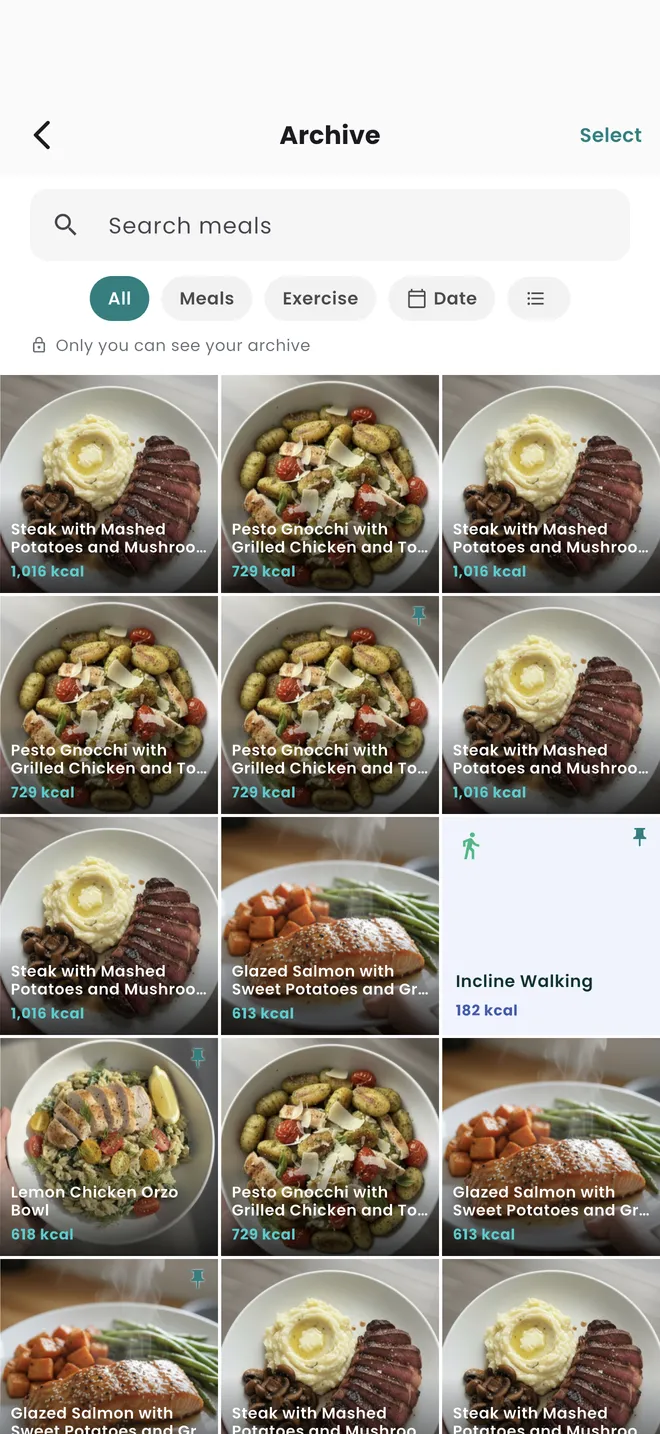
Nutrify keeps every meal you photograph in an archive, a private grid of your past meals with the calorie count on each one, filterable by meals, exercise or date. The photo is the log: you take the picture, the AI reads the plate, and the image and its nutrition stay attached to each other. The archive is labelled "Only you can see your archive", so nothing in it is shared or posted anywhere.
Why it matters
People dramatically underestimate how much they eat in ways that numbers alone don't reveal. A nutrition log might show 1,800 calories, but it won't show that you eat lunch at your desk every day while distracted, or that weekends involve three snacks you're not accounting for, or that your portion sizes have gradually increased. A photo journal creates a visual record that tells a richer story than numbers can, and the act of taking a photo before eating, research suggests, actually increases mindfulness around food choices. What you record honestly is what you can improve.
What is a photo food journal?
A photo food journal is a food diary kept in pictures rather than entries. You photograph what you eat, and the images build into a visual record you can scroll back through. Dietitians and researchers used the method long before phones made it easy, because a photograph captures things a written log does not: what the portion genuinely looked like, what was on the plate that you would not have thought to write down, and how the meal compares to the same meal three weeks ago. Modern versions add nutrition on top, so the picture carries its calorie and macro data with it. The result answers two different questions at once. The numbers tell you how much, and the photographs tell you what your eating actually looks like across a week, which is usually the more surprising of the two.
How it works in Nutrify
Simple enough to actually do every day
Snap your meal before you eat
Take a photo of your food, that's the entire logging process.
AI reads and logs the nutrition
Nutrify analyzes the photo and logs the calories and macros automatically. No manual work.
Browse your visual diary
Scroll back through your food journal by day or week, a complete picture of how you actually eat.
Every meal you have logged
A private grid of everything you have eaten
Why Nutrify specifically
Built for this, not bolted on
Taking the photo is the log
No manual entry needed. Point the camera, AI reads the meal, nutrition is logged. The photo and the data stay together.
Scroll through your week
Browse your visual diary and spot patterns that numbers alone never show, what you actually ate, not just what you recorded.
Real accountability
Reviewing your past week of meals creates honest reflection. It's the difference between thinking you eat well and seeing that you do.


The photo is the log, and it stays the receipt
In Nutrify, photographing a meal is not a step before logging it, it is the logging. The camera reads the plate, the estimate is produced, and the image stays attached to the entry rather than being discarded once the numbers exist. That attachment is what makes the archive worth anything. A number in a diary from eleven days ago cannot be checked, so if it looks wrong you have no way to tell whether the meal was unusual or the estimate was. With the photograph still there, you can look, and you either confirm the number or correct it. Most food diaries throw away the only evidence they ever had.
A private grid, and the privacy is the feature
The archive is marked "Only you can see your archive", and it is worth saying plainly why that matters. A record you would be willing to show people is a curated record, and a curated food diary is worthless, because the entries you would quietly leave out are exactly the ones worth having. Social food feeds create that pressure by design, subtly rewarding the photogenic meals and making the unphotogenic ones feel like something to skip. A private archive removes the audience, and with it the incentive to perform. What you get back is a record that is boring, unflattering, and actually representative.
Portion drift shows up in pictures and hides in numbers
Serving sizes creep. The bowl of cereal you poured in January and the one you pour in June are usually not the same bowl, and nothing in a calorie total reveals that, because the estimate moves with the portion. Photographs of the same meal weeks apart make it obvious in a second. This is the specific thing a visual diary catches that a numeric one structurally cannot: gradual change in a repeated habit. It is also the most common explanation for a stall in progress, when nothing about your routine appears to have changed but the average has quietly moved by a couple of hundred calories a day.
Filters turn a scrolling grid into an actual question
A photo journal that only supports scrolling is a nice thing to look at once. The archive is filterable by meals, by exercise, and by date, which is what converts it into something you can interrogate. Pull up your last four weekends and compare them to your weekdays. Look at a fortnight where the weight moved and one where it did not. Check every dinner from a particular month. The pattern people find this way is almost never the one they went looking for, and it is nearly always about a specific recurring situation rather than about willpower in general.
Photographing before you eat changes the meal slightly
There is a well-known effect in self-monitoring generally, that recording a behaviour tends to alter it, and it applies here in an ordinary and unglamorous way. Pointing a camera at a plate inserts one deliberate second between serving and eating. Some of the time nothing happens. Occasionally you look at the plate properly for the first time. This is not a diet strategy and it is not worth overselling, but it is a real side effect of the habit and it costs nothing. It is also the reason the photo is worth taking before the meal rather than reconstructing the entry afterwards.
What users say
Reviews from the App Store
• If you are doing intermittent fasting or just trying to eat decently, this app is for you. • If you want to take a pic of your meal, instead of looking up every part of it, this app is for you. • If you want to track your exercise and measurements progress, this app is for you. • If you want to track your water intake, this app is for you. Yes, Nutrify Tracker does all of those things and more.
I've tried it all and ended up here. An uncluttered and easy use app which helped me restructure my weight loss to background noise. Organises and tracks every health initiate from supplements to exercise and fasting. AI refinement and photo analysis of my food logs. Less effort and time from me to get results. I purchased the lifetime access and after 2 months and a steady 6 kg loss which I barely committed to, I'm thrilled I made that choice
I've been through at least 6 food trackers and this one is the keeper. Just started GLP-1, you find out really quickly that you need to track your nutrients, and this app tracks everything I need: protein, fiber, carbs, calories, weight progress. It specifically supports a GLP-1 diet nutrient focus (gives you the choice of several other diets too). The interface is super easy, take a photo of your food, the AI nutrients estimates are very accurate. And important for GLP-1 users, it lets you adjust your meal based on actual consumption ( because you know you can never finish your whole meal).
FAQ
Photo Food Journal questions, answered
Look for three things: the photograph should be kept with the entry rather than deleted after analysis, the record should be private by default, and it should be browsable and filterable rather than a plain reverse-chronological scroll. Nutrify keeps every photographed meal in a private archive with its calorie count attached, filterable by meals, exercise or date, and it is free to download on iOS and Android.
Yes. Photograph the plate and Nutrify identifies the components, estimates the portions and produces calories and macros with an ingredient list attached. The estimate is editable line by line, so a portion that was read too generously is one adjustment. The picture stays with the entry afterwards, which is what lets you check an old log rather than just trusting it.
Yes. The archive is labelled "Only you can see your archive" and it is not a feed. Nothing is posted, shared or shown to other users as a consequence of logging a meal. This is deliberate: a food diary you would be comfortable showing people is one you have already edited, and an edited record cannot tell you anything useful.
Open the archive and filter by date. You get a grid of the meals you photographed with their calorie counts, and you can narrow it to meals or exercise if you are looking for something specific. It is faster than scrolling a diary day by day, and easier to spot a pattern in, because you are seeing dozens of meals at once instead of one screen per day.
Self-monitoring tends to influence the behaviour being monitored, and photographing a meal adds a brief pause before eating that some people find useful. The larger and more reliable benefit is retrospective. Reviewing a month of your actual meals is a very different experience from reviewing a month of totals, and it surfaces habits, portion changes and recurring situations that the numbers flatten out.
No, and you will not want to. Photographing is best for meals you did not prepare and cannot easily describe, and for anything you eat often enough that comparing it over time is informative. Packaged food is better scanned, and something you are eating on the move is quicker described out loud. The archive fills up with whatever you did photograph.
Yes. The archive grid shows each meal photo with its calorie count on the image, so you can read the whole month without opening individual entries. Tapping through gets you the full detail screen with macros, fibre and sugar, glycemic index and load and the ingredient breakdown for that meal.
Accurate enough for weekly averages, which is the level that matters, but it is an estimate from a single viewpoint and it cannot see fat absorbed during cooking or ingredients hidden under others. Correct the ingredient list where you know better, particularly the cooking oil, and scan packaged food instead of photographing it. Consistency across the week affects your average far more than precision on one plate.
And you also get
Photo Food Journal is one piece of it.
Every Nutrify user gets the full app: AI food recognition, analytics, health integrations, and everything below.
Meal Logging
Most food diary apps fail because logging a meal takes longer than eating it. Nutrify flips that: photo, voice, barcode, or text, your meal is logged before you put down your fork.
Ingredient Breakdown
Knowing your meal has 600 calories is one thing. Knowing it's the dressing, not the chicken, that's adding 300 of them, that's the information that actually changes what you order next time.
Nutrition Analytics
Nutrify's analytics show your nutrition trends over days, weeks, and months, so you can see what's actually working, what's not, and where the gaps are.
Body Measurements
Weight fluctuates by 2-3 pounds day to day from water alone. Body measurements tracked consistently over weeks show what's actually changing, and how your nutrition is driving it.
Voice & Text Input
Speak naturally and Nutrify figures out the rest. "Two scrambled eggs and a coffee with oat milk", logged with full macros in under two seconds.
Keep reading
Ready to try Photo Food Journal?
Free to download. Every feature free for 7 days, and you can cancel any time.