
Scan the barcode. Done.
Point your camera at any packaged food and get the full nutrition label in under a second. No searching, no typing, no estimating. Just scan and log.
The short answer
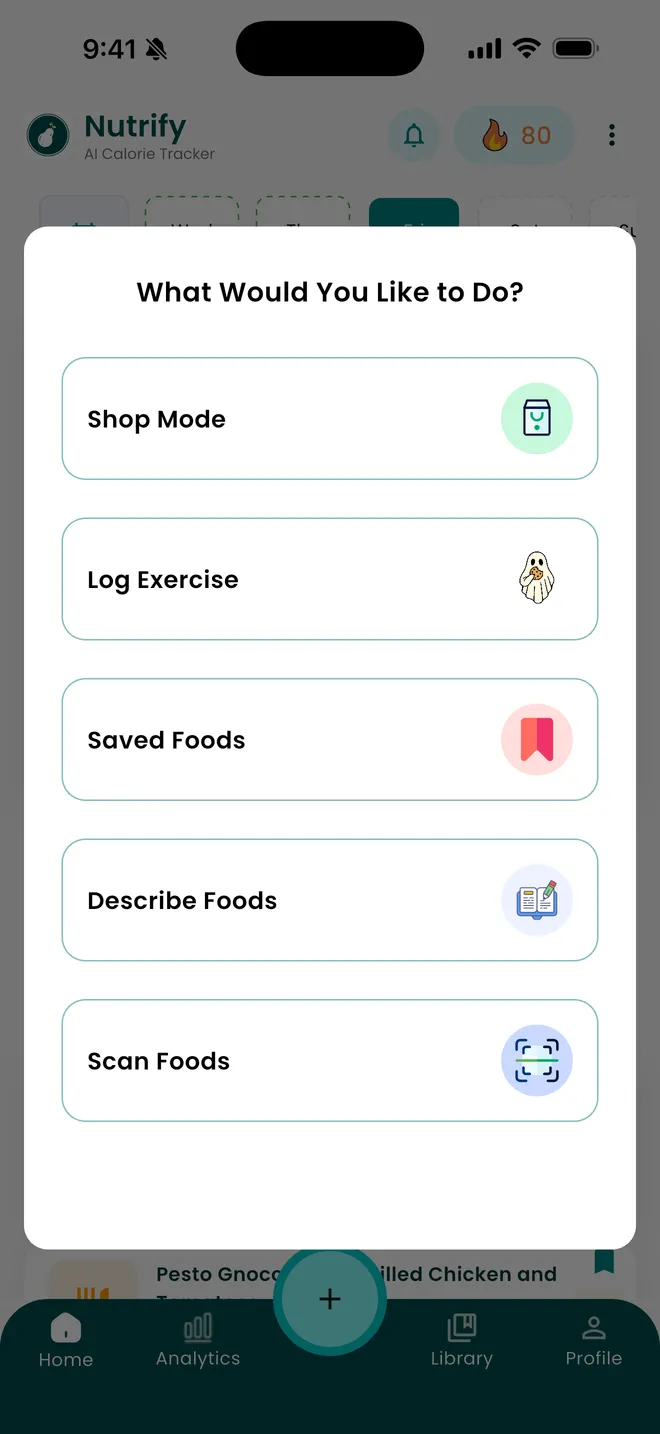
Point Nutrify's scanner at the barcode on any packaged food and it looks the product up and fills in the nutrition label, so you set the portion and log it. Scanning is one of six ways to log in Nutrify, alongside photo, voice, typed description, saved foods and Shop Mode for scanning products while you shop. It is free to download on iOS and Android, and scanned items land on the same food detail screen as everything else, with macros, fibre and sugar, glycemic index and load and a Nutrify Score.
Why it matters
Packaged food is one of the easiest things to track accurately, every product already has a nutrition label. The frustrating part is that most apps still make you type in product names and scroll through results that don't match. A barcode scanner turns a 30-second process into a one-second process, and that speed difference is what separates apps people use consistently from apps people abandon. When scanning is truly instant, logging packaged food becomes effortless enough that it actually becomes a habit.
What is a barcode food scanner?
A barcode food scanner uses your phone camera to read the EAN or UPC code printed on a package, then looks that number up in a product database and returns the nutrition declared on the label. The barcode itself carries no nutritional information at all. It is only an identifier, roughly the product equivalent of a phone number, and everything you see afterwards depends on whether that product exists in the database being queried and whether the person or company that entered it did so accurately. This is why the same tin of beans can produce slightly different figures in two different apps, and why coverage varies by country. Databases are built from a mix of manufacturer submissions and user contributions, so national supermarket own-brands are usually well covered in their home market and thin everywhere else.
How it works in Nutrify
Simple enough to actually do every day
Tap Scan
Open the barcode scanner from the log screen.
Point at the barcode
Aim at any packaged product, front label or back barcode, either works.
Set serving size and log
Adjust the portion if needed and add it to your diary.
Log any food, any way
Scan a barcode, speak it, or check products in store
Why Nutrify specifically
Built for this, not bolted on
Sub-second recognition
Point and it reads. No waiting, no re-scanning, no mis-reads. Just instant results.
Millions of products covered
From supermarket staples to regional brands, the database covers what you actually buy, including products from multiple countries.
Missing product? Add it in seconds.
If a product isn't found, you can add it manually and help others find it too.


A barcode is a lookup key, not a nutrition label
Scanning feels like reading the packet, but it is a database query. The code identifies the product and the numbers come from a record that someone had to create. That distinction explains most of the frustrations people have with scanners. A product missing from the database is not a camera failure, it is a coverage gap. A product whose figures look wrong is not a misread, it is a bad record. It also explains regional behaviour: a scanner that performs beautifully in a British supermarket can struggle with the same category of product in India or Brazil, because the underlying records were contributed by people shopping somewhere else.
Serving size is where scanned entries actually go wrong
The scan is rarely the error. The portion is. Labels are declared per 100g, per serving, or both, and packs routinely contain two or three servings while being eaten as one. Confusing per-100g values with per-serving values is the single most common way a scanned log ends up wrong, and it is usually wrong by a factor rather than a rounding difference. It is worth glancing at the number of servings on the pack before you log, especially for snack bags, sauces, cereals and anything sold in a bottle. Nutrify lets you set the portion after the scan rather than assuming one serving, which is the point at which to check.
Scanning in the aisle is worth more than scanning at the table
By the time a product is in your kitchen the decision has already been made. Shop Mode exists for the moment that still matters, when you are holding two options in a supermarket and cannot sensibly compare them because the labels use different serving sizes and different orders of information. Scanning both puts them into the same format, so protein per portion, sugar per portion and sodium per portion line up. This turns a packaging comparison, which is designed by marketers, into a nutritional one. It is a slower way to shop the first few times and considerably faster afterwards, because most people buy the same forty products.
What to do when a product is not in the database
Every scanner has gaps, and pretending otherwise is how apps lose trust. Loose produce has no barcode at all. Bakery items, deli counters and market food have none either. Regional and store own-brands come and go. When Nutrify does not find a code you have three fallbacks: add the product yourself from the label, which also makes it findable next time, photograph the food, or describe it in words. The practical rule is that a barcode is the best path for packaged food and a poor one for everything else, so it is worth having the other routes ready rather than treating a failed scan as the end of the attempt.
Scanned data is the most reliable number you will get, within limits
A declared label value is a manufacturer's figure for an average unit of that product, produced under rules that allow a tolerance rather than requiring exactness for the item in your hand. It is still comfortably the most reliable input any tracking app receives, far better than a visual estimate, and you should prefer it whenever it exists. Just do not treat it as a measurement. The useful consequence is that scanned packaged food gives you a stable baseline, so the variance in your week comes almost entirely from cooked and restaurant meals, which is where it is worth spending your attention.
What users say
Reviews from the App Store
I've tried many calorie tracking apps but i'd say this is the best one yet, the ai food scanner is really accurate and has been helping me stay on track with its healthy eating recommendations. Overall it's really simple to use and has been keeping me motivated to achieve my goal :)
I've been through at least 6 food trackers and this one is the keeper. Just started GLP-1, you find out really quickly that you need to track your nutrients, and this app tracks everything I need: protein, fiber, carbs, calories, weight progress. It specifically supports a GLP-1 diet nutrient focus (gives you the choice of several other diets too). The interface is super easy, take a photo of your food, the AI nutrients estimates are very accurate. And important for GLP-1 users, it lets you adjust your meal based on actual consumption ( because you know you can never finish your whole meal).
Nutrify has been such a huge part of me getting my life back on track. I'm on a weight‑loss and diabetes journey, and for many I felt like I didn't having any direction and hoping for the best. This app finally gave me something solid to hold onto. I LOVE the analytics! It actually helps me understand my food, my numbers, and my habits in a way that makes sense to me. I can see what's helping, what is not, and what I need to adjust without feeling judged or self-conscious about it.
FAQ
Barcode Scanner questions, answered
Yes. Open the scanner in Nutrify, point the camera at the barcode on the pack, and the product's nutrition is filled in for you. You then set how much of it you are eating and log it. It is the fastest and most accurate route for anything that comes in a package, because the numbers come from the manufacturer's declared label rather than an estimate.
Judge it on three things: how well the database covers the shops you actually use, how quickly the camera locks on, and what happens when a product is missing. Coverage is regional, so an app that is excellent in one country can be thin in another. Nutrify scans packaged food, lets you add missing products, and falls back to photo or spoken logging when there is no barcode to read.
Almost always because that product is not in the database rather than because the camera failed. Own-brand, regional and newly launched products are the usual gaps, and repackaged or imported goods often carry a code that is not registered locally. You can add the product from its label so it is available next time, or log it by photo or description instead.
It is the most accurate input a tracking app gets, because it comes from the label the manufacturer declared. Two caveats apply. Declared values are averages for the product with a permitted tolerance, not a measurement of your specific item, and crowd-contributed records can contain mistakes. If a scanned figure looks obviously wrong against the pack in your hand, edit it before logging.
Use Shop Mode, which is built for scanning in the aisle rather than at the table. Scan a product to see its full breakdown before it goes in your trolley, and scan a second one to compare them on the same footing. It is the most useful place to scan, because what you buy determines what you eat all week.
Product lookup depends on a database, so a scan generally needs a connection to resolve a code you have not seen before. Foods you have already saved to your library are available to log without repeating the lookup, which covers most of what people eat regularly. Supermarket signal is patchy in a lot of buildings, so it is worth knowing before you are standing in one.
Loose fresh food has no barcode to read, so no scanner can help. Photograph it or describe it instead, which is what the other logging paths are for. Pre-packed fresh items such as bagged salad or a punnet of berries do carry a code and scan normally. Deli, bakery and market food generally does not.
Nutrify is free to download on iOS and Android with a 7-day free trial of the paid tier, and it currently holds a 4.7 rating from 60 App Store ratings. Most apps in the category offer scanning in some form, so the more useful question is which one covers the products in your local shops, since that varies far more than the feature list does.
And you also get
Barcode Scanner is one piece of it.
Every Nutrify user gets the full app: AI food recognition, analytics, health integrations, and everything below.
Grocery Shop Mode
Most nutrition decisions happen in the grocery store, not at the dinner table. Nutrify's Shop Mode lets you scan any product and see its full nutrition label before you commit to it.
Meal Logging
Most food diary apps fail because logging a meal takes longer than eating it. Nutrify flips that: photo, voice, barcode, or text, your meal is logged before you put down your fork.
Voice & Text Input
Speak naturally and Nutrify figures out the rest. "Two scrambled eggs and a coffee with oat milk", logged with full macros in under two seconds.
Ingredient Breakdown
Knowing your meal has 600 calories is one thing. Knowing it's the dressing, not the chicken, that's adding 300 of them, that's the information that actually changes what you order next time.
Photo Food Journal
Numbers tell you what. Photos show you why. A visual food diary makes patterns obvious in a way that calorie totals never do, and logging it is as simple as taking the photo.
Keep reading
Ready to try Barcode Scanner?
Free to download. Every feature free for 7 days, and you can cancel any time.