
Log your workout. Know what you've earned.
Exercise changes what your body needs. Nutrify tracks your workouts and adjusts your calorie targets automatically, so you know exactly how much to eat without under or overfueling.
The short answer
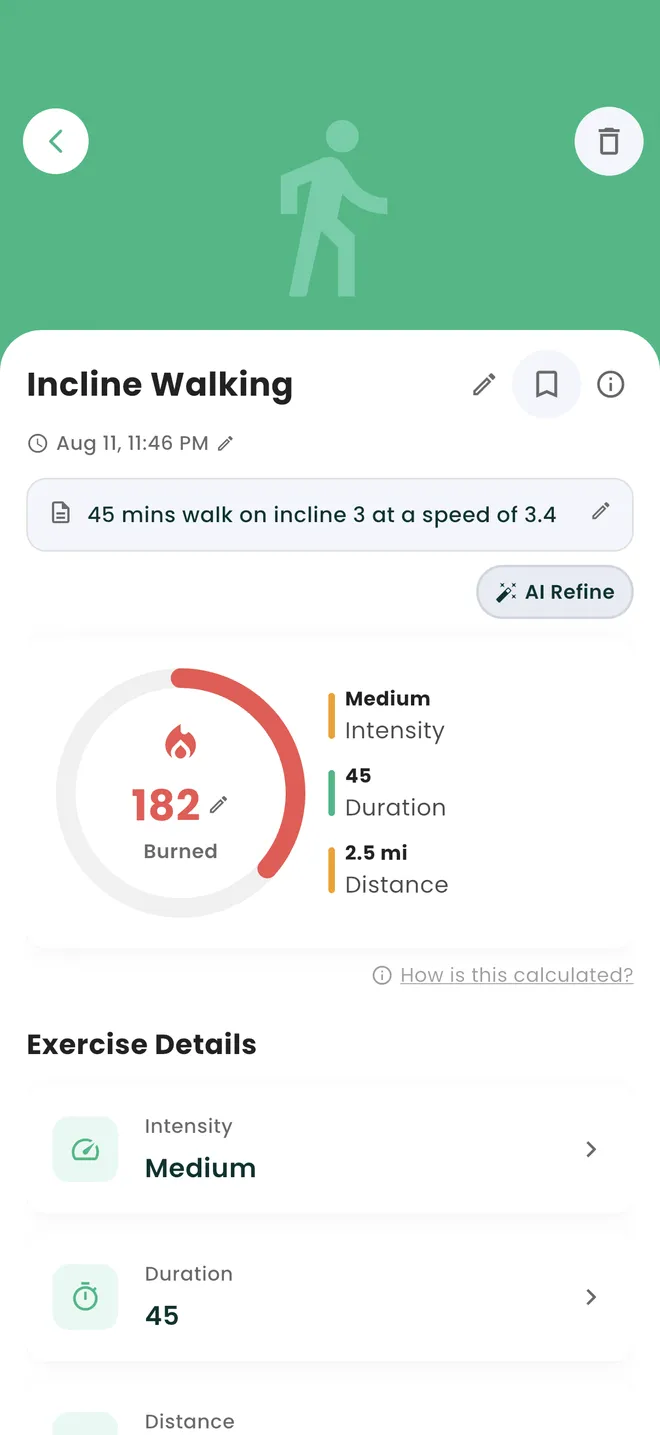
Nutrify logs a workout from a plain description you type or speak, such as "45 mins walk on incline 3 at a speed of 3.4", and estimates the calories burned from it, showing intensity, duration and distance. If the number looks off, an AI Refine button reworks the estimate, and a "How is this calculated?" link shows what went into it. On iOS, steps and active energy come in from Apple Health.
Why it matters
Nutrition without exercise context is incomplete, and exercise without nutrition context is where most people leave results on the table. Undereating after hard training sessions blunts recovery and adaptation. Overeating on rest days undermines a calorie deficit. The reason people plateau or feel constantly fatigued often isn't their training or their diet in isolation. It's the disconnect between the two. When your food tracker knows what you burned, it can give you a daily target that reflects your actual energy needs for that day. That's the difference between a static diet plan and nutrition that actually responds to your life.
What does exercise tracking mean in a calorie app?
In a nutrition app, exercise tracking is not a training log. It is the other half of the energy equation. Your body spends energy on three things: staying alive, which is your basal metabolic rate, digesting food, and moving. Exercise tracking tries to put a number on the last of those so your daily calorie budget reflects the day you actually had rather than an average one. The number itself is always an estimate. Consumer apps derive it from the activity type, its duration and intensity, and your body weight, sometimes adjusted by heart rate from a watch. Two people doing the identical session will not burn the identical amount, and neither will the same person on two different days. That is why the useful output is a consistent estimate you can compare against yourself over weeks, not a precise figure.
How it works in Nutrify
Simple enough to actually do every day
Log your workout
Search for your activity and enter duration, or let your connected wearable sync it automatically.
See your updated calorie budget
Your remaining calories for the day reflect what you burned, not just your base target.
Fuel accordingly
Eat to your adjusted targets and give your body what it actually needs that day.
Workouts count toward your day
Log it in words and let the AI do the maths
Why Nutrify specifically
Built for this, not bolted on
Exercise updates your calorie budget
Log a run and your remaining calories for the day adjust automatically based on what you actually burned.
Extensive exercise database
From weightlifting to swimming to walking, find and log any workout with accurate calorie burn estimates.
Syncs with your wearable automatically
Connect Apple Health or Google Fit and your workout data comes in automatically, no manual entry needed.


Every calorie burn number you have ever seen is an estimate
Treadmill displays, watch readouts and app figures are all models. They take an activity, a duration, an intensity and your body weight and produce a number, and none of them can see your actual metabolism, movement economy or fitness level. Nutrify puts a "How is this calculated?" link next to the estimate for that reason, because a number without a stated basis invites the wrong kind of trust. The practical consequence is worth stating: use the estimate to compare Tuesday with Thursday, not to balance your day to the calorie. Consistency in how you estimate matters far more than accuracy in any single figure.
Describing the workout beats picking it from a list
Activity databases force you into a category. "Walking, brisk" flattens the difference between a flat stroll and forty-five minutes on an incline, and that difference is most of the energy cost. Nutrify takes the description instead, typed or spoken: "45 mins walk on incline 3 at a speed of 3.4". The incline and the speed are exactly the variables that change the answer, and a picker with three walking options throws them away before the calculation starts. It is also faster than scrolling, which matters because the workouts people fail to log are the ones that took several taps to find.
AI Refine exists because the first estimate is a draft
The first number the app returns is derived from what you described, and sometimes what you described was incomplete or the estimate simply reads too high for the effort you remember. AI Refine reworks it rather than making you delete the entry and start again. This is a small thing that changes behaviour: when correcting a number is easy, people correct it, and when it means retyping the whole session, they either accept a figure they do not believe or stop logging exercise entirely. A log full of numbers you privately distrust is worse than no log at all.
The same hour can end up counted twice
If your watch has already recorded a run as active energy and you then log the same run by hand, the day counts that hour twice, and your calorie budget quietly inflates. This is the single most common reason people find their tracker generous. On iOS, Nutrify reads steps and active energy from Apple Health, so the sensible pattern is to let synced activity cover what your watch saw and use manual logging for what it did not: a weights session, a swim, a class where you left your watch in a locker. Decide which source owns which activity and stick to it.
Eating back what you burned is where the deficit quietly goes
If your session estimate is generous by a few hundred calories and you eat all of it back, the deficit you thought you had is gone, and nothing about your training or your discipline was at fault. The arithmetic just ran on an inflated input. There is no single correct policy here, but the common approach is to eat back only part of a burn, treating the estimate as a ceiling rather than a target. Nutrify shows you the burn and the adjusted budget separately, so at least you can see which number you are choosing to trust.
What users say
Reviews from the App Store
• If you are doing intermittent fasting or just trying to eat decently, this app is for you. • If you want to take a pic of your meal, instead of looking up every part of it, this app is for you. • If you want to track your exercise and measurements progress, this app is for you. • If you want to track your water intake, this app is for you. Yes, Nutrify Tracker does all of those things and more.
I've tried it all and ended up here. An uncluttered and easy use app which helped me restructure my weight loss to background noise. Organises and tracks every health initiate from supplements to exercise and fasting. AI refinement and photo analysis of my food logs. Less effort and time from me to get results. I purchased the lifetime access and after 2 months and a steady 6 kg loss which I barely committed to, I'm thrilled I made that choice
I've been through at least 6 food trackers and this one is the keeper. Just started GLP-1, you find out really quickly that you need to track your nutrients, and this app tracks everything I need: protein, fiber, carbs, calories, weight progress. It specifically supports a GLP-1 diet nutrient focus (gives you the choice of several other diets too). The interface is super easy, take a photo of your food, the AI nutrients estimates are very accurate. And important for GLP-1 users, it lets you adjust your meal based on actual consumption ( because you know you can never finish your whole meal).
FAQ
Exercise Tracking questions, answered
Describe the session in plain language, typed or spoken, and Nutrify estimates the burn from it. "45 mins walk on incline 3 at a speed of 3.4" gives a better answer than picking "walking" from a list, because incline and speed are what change the number. You get intensity, duration and distance alongside the estimate, and an AI Refine button if it reads wrong.
They are estimates, and every source you have used has been one, including gym equipment and watches. They are derived from activity, duration, intensity and body weight, and cannot account for individual differences in metabolism or efficiency. Use them to compare your own sessions over time rather than to balance a day exactly. Nutrify links to a "How is this calculated?" explanation instead of presenting the figure as a fact.
Not all of them, usually. Burn estimates tend to run generous, so eating back the full figure is the most common way a deficit disappears without anyone doing anything obviously wrong. Many people eat back part of it, treating the estimate as a ceiling. Nutrify keeps the burn and the adjusted budget visible separately so you can see exactly which number your decision is resting on.
Yes. Say what you did the way you would say it to a person and Nutrify parses the description into an activity with duration, intensity and distance. It is faster than scrolling a database, and it keeps the details a picker would discard, like an incline setting or a specific pace, which are the parts that actually move the estimate.
On iOS, steps and active energy are read from Apple Health, so whatever your iPhone or Apple Watch already recorded flows into Nutrify without you entering it. Nutrify also syncs with Health Connect on Android for nutrition and other supported data. For anything your watch did not see, such as a weights session, log it manually.
No. Typing or speaking a description works on its own and is the primary way exercise is logged. A watch helps mainly by capturing movement you would never bother to log, like everyday walking. If you do have one, decide which activities the watch owns and which you log by hand, so the same session does not get counted from both sources.
Active calories are what your movement cost on top of simply existing. Total calories include your resting expenditure, the energy you would have spent lying still all day. Confusing them is how people end up with a wildly inflated daily budget, because the resting portion is already built into your calorie target before any exercise is added.
It depends on your body weight, the pace, the incline and the duration, which is why any single figure you see quoted is close to meaningless without those inputs. Our free calories burned calculator gives you a number from your own details, and in the app you can just describe the walk including the incline and speed and get an estimate from that.
Because your budget reflects what you actually did rather than a fixed daily number. Logging or syncing a session adds the estimated burn to the day, so your remaining calories increase. Worth remembering that the increase is only as good as the estimate behind it, which is the argument for not eating the whole amount back.
And you also get
Exercise Tracking is one piece of it.
Every Nutrify user gets the full app: AI food recognition, analytics, health integrations, and everything below.
Apple Health & Google Fit
Nutrify syncs with Apple Health and Google Fit so your food data and activity data live together. Your calorie targets adjust automatically based on what you actually burned.
Nutrition Analytics
Nutrify's analytics show your nutrition trends over days, weeks, and months, so you can see what's actually working, what's not, and where the gaps are.
Body Measurements
Weight fluctuates by 2-3 pounds day to day from water alone. Body measurements tracked consistently over weeks show what's actually changing, and how your nutrition is driving it.
Meal Logging
Most food diary apps fail because logging a meal takes longer than eating it. Nutrify flips that: photo, voice, barcode, or text, your meal is logged before you put down your fork.
Health Score
Hitting your calorie target doesn't mean you're eating well. Nutrify's Health Score looks at your full diet (fiber, protein, sugar, micronutrients) and gives you an honest number.
Keep reading
Ready to try Exercise Tracking?
Free to download. Every feature free for 7 days, and you can cancel any time.