
Your injection log and your food log, in the same app.
People on a GLP-1 medicine usually end up keeping two records: one for the shot, one for what they ate. Nutrify holds the dose, the schedule and the next injection site next to your protein, your weight trend and your measurements.
The short answer
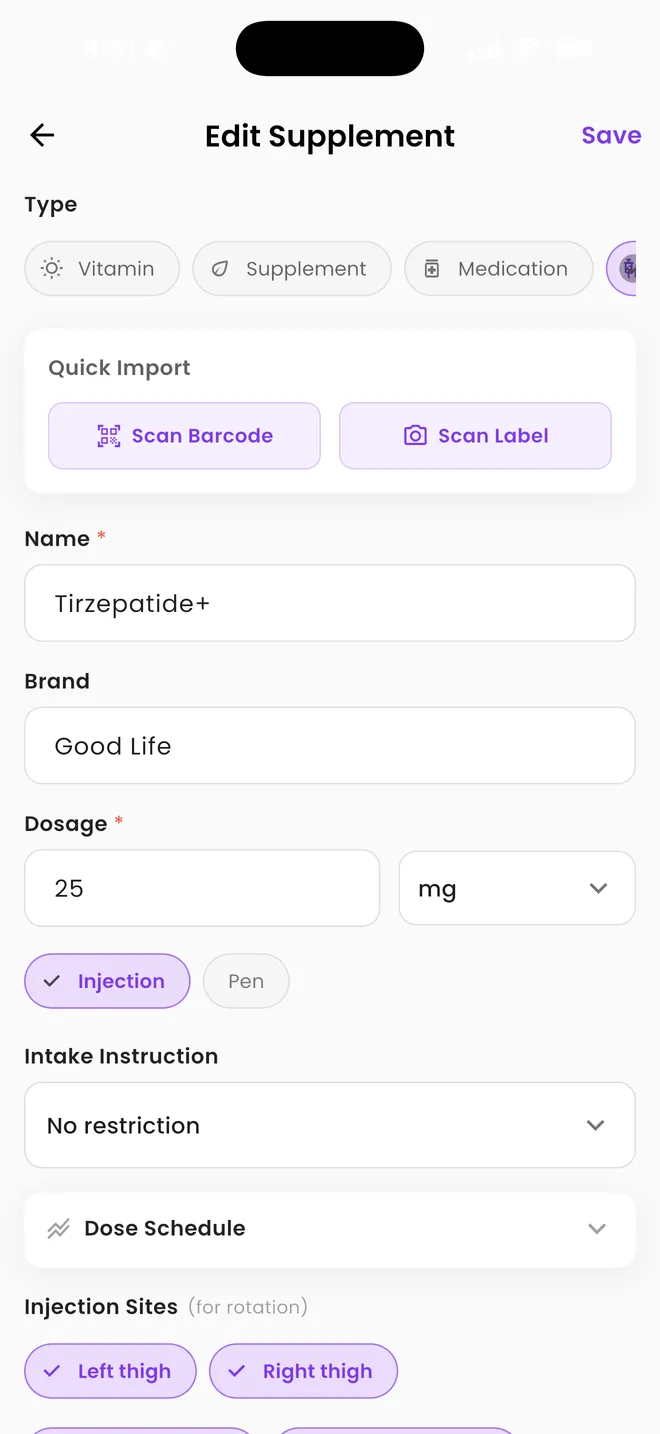
Nutrify logs GLP-1 injections alongside your vitamins, supplements and medications, grouped by time of day. Each entry holds the dosage in mg, a pen or injection toggle, the dose schedule, the brand and the intake instructions, and there is an injection site rotation list that names the next site to use. Because it is a full nutrition tracker, protein, calories, weight trend and body measurements sit in the same place. It is a record, not a dosing tool: what you take and when you take it is decided by your prescriber. Free to download on iOS and Android.
Why it matters
GLP-1 receptor agonists are prescription medicines, and the tracking problem they create is a practical one rather than a clinical one. The dose can change between months, the schedule is often weekly rather than daily, the site is meant to move each time, and none of that is information anyone reconstructs accurately from memory at an appointment. At the same time, eating less overall makes the composition of what you do eat matter more, because a smaller total has to carry the same protein and the same micronutrients. Most people solve this with a note on their phone for the shot and an app for the food, and then have two records that never meet. Keeping them in one place is not a medical intervention. It is bookkeeping, and it is the part software is actually good at.
What is a GLP-1 tracker app?
GLP-1 receptor agonists are a class of prescription medicine given by subcutaneous injection, usually on a fixed schedule. A GLP-1 tracker is a personal record of that treatment and the eating that happens around it: which dose was administered, on which date, at which site, and what your nutrition and weight did over the same period. It is not a dosing calculator and it does not decide anything. The reason a general food diary is a poor fit is that it has nowhere to put an injection, and the reason a medication reminder is a poor fit is that it has nowhere to put a meal. People on these medicines are the group most likely to need both records to line up, since the questions they are asked at a review tend to span the two.
How it works in Nutrify
Simple enough to actually do every day
Add the medicine
Scan the barcode or the label, or enter it manually, then set the brand and the dosage in mg exactly as it was prescribed to you.
Set the schedule and the slot
Give it the dose schedule you were given and the time of day it belongs to, so it appears on the days it is due and stays out of the way on the days it is not.
Log the dose and read the next site
Mark it administered when you take it. The rotation list moves on and names where the next one goes, and the record builds itself in the background.
Dose schedules and site rotation, handled
Dosage in mg, the schedule, and where the next one goes
Why Nutrify specifically
Built for this, not bolted on
One record instead of two
The injection, the dose and the site sit in the same app as your meals, weight and measurements, so the timeline is continuous rather than split across a note and a diary.
The fields an injection actually needs
Dosage in mg, a pen or injection toggle, the dose schedule, the brand and the intake instructions. A checkbox is enough for a vitamin and is not enough for this.
The next site is named for you
A rotation list of left thigh, right thigh, abdomen, upper arm and the rest, with the next one to use shown rather than remembered.


What this is for, and what it is deliberately not for
Nutrify records what happened. It does not suggest a dose, propose a schedule, tell you when to move up or down, compare medicines, or interpret a symptom. Those decisions belong to the person who prescribed the medicine, and an app that offered opinions on them would be doing something it has no business doing. What software can do well is remember: which dose you were on in March, whether you took last week's, where the last three went, and what your protein intake looked like across the same weeks. That is the gap most people actually have. If you have a question about the medicine itself, the answer is a conversation with your prescriber or pharmacist rather than a screen.
A dose is not one number
Trackers that model a dose as a single figure lose most of what makes it useful later. What identifies an administration is the amount in milligrams, the brand it was, whether it came from a pen or was drawn and injected, the schedule it sits on, and the instructions that came with it. Nutrify keeps all of those on the entry rather than flattening them into a checkbox, which matters because these details change over time and because the version you are on now is rarely the version you started with. When you are asked to describe your history, the difference between a useful answer and a shrug is whether something wrote it down at the time.
Eating less makes protein the number worth watching
When total intake comes down, the composition of what remains carries more weight. Protein is the one people ask about most, and it is a general nutrition question rather than a medication question: in a calorie deficit, protein intake and resistance training are the levers usually discussed for preserving lean mass. Nutrify totals protein from what you log, shows it against a target, and trends it by week so a single good day does not hide four thin ones. Setting the right target for your body and your situation is a conversation for your clinician or dietitian. Hitting it consistently is the part the app can help with.
Site rotation is a bookkeeping problem
Instructions for subcutaneous injectables generally ask you to rotate sites, and the principle is not the difficult part. Remembering where the last one went, a week later, is. Nutrify keeps a rotation list, left thigh, right thigh, abdomen, upper arm and whatever else applies to you, and names the next site so the decision is read off a screen instead of reconstructed. Over a few months you are left with the actual pattern rather than an impression that you have been alternating. Which sites are appropriate for your medicine and device comes from your product instructions and your clinician, not from an app.
Weight, measurements and photos over the same weeks
Body weight moves for reasons that have nothing to do with the week you had, so a single reading is close to meaningless and the trend across weeks is what carries information. Nutrify keeps weight, body measurements such as waist and hips, and a progress photo journal alongside the injection and food log, so the same period can be read several ways rather than through one number that happened to be taken on a bad morning. Measurements are particularly worth having when weight stalls, because the scale can sit still through a change that a tape measure picks up.
What a tracker can answer, and what only your prescriber or pharmacist can. Nutrify is a record of what happened, not a source of medical advice.
| The question | What the app can do | Who actually decides |
|---|---|---|
| Which day is this dose due | Holds the schedule you were given and shows the entry on the days it applies | Your prescriber sets the schedule |
| What dose was I on three months ago | Keeps the history in mg with the date of each administration and the brand | Your prescriber decides if and when it changes |
| Where does the next injection go | Names the next site from your own rotation list and records where each one went | Your product instructions and clinician define which sites apply to you |
| Am I getting enough protein | Totals protein from what you log and trends it against a target you set | A clinician or dietitian sets a target that fits your situation |
| Is this side effect normal | Nothing. It does not interpret symptoms and will not try to | Your prescriber or pharmacist, and it is worth asking rather than searching |
What users say
Reviews from the App Store
I've been through at least 6 food trackers and this one is the keeper. Just started GLP-1, you find out really quickly that you need to track your nutrients, and this app tracks everything I need: protein, fiber, carbs, calories, weight progress. It specifically supports a GLP-1 diet nutrient focus (gives you the choice of several other diets too). The interface is super easy, take a photo of your food, the AI nutrients estimates are very accurate. And important for GLP-1 users, it lets you adjust your meal based on actual consumption ( because you know you can never finish your whole meal).
I've tried it all and ended up here. An uncluttered and easy use app which helped me restructure my weight loss to background noise. Organises and tracks every health initiate from supplements to exercise and fasting. AI refinement and photo analysis of my food logs. Less effort and time from me to get results. I purchased the lifetime access and after 2 months and a steady 6 kg loss which I barely committed to, I'm thrilled I made that choice
Nutrify has been such a huge part of me getting my life back on track. I'm on a weight‑loss and diabetes journey, and for many I felt like I didn't having any direction and hoping for the best. This app finally gave me something solid to hold onto. I LOVE the analytics! It actually helps me understand my food, my numbers, and my habits in a way that makes sense to me. I can see what's helping, what is not, and what I need to adjust without feeling judged or self-conscious about it.
FAQ
GLP-1 Tracker questions, answered
Yes. Nutrify logs injections alongside vitamins, supplements and medications, grouped by the time of day you take them. Each injection entry carries the dosage in mg, a pen or injection toggle, the dose schedule, the brand and the intake instructions, plus a site rotation list that names where the next one goes. It is a record of what you did, not a dosing tool.
You can record any injectable you have been prescribed, with the brand, the dosage in mg and the schedule as they were given to you. Nutrify does not maintain opinions about specific products, does not compare them and will not suggest one over another. It stores what you enter so that you and your prescriber have an accurate history to look at.
That is not a question an app should answer, and Nutrify does not try. Dose and schedule for a prescription medicine are set by the person who prescribed it, adjusted by them, and discussed with them. What the app does is hold what you were told accurately, so that neither of you is relying on memory at the next appointment.
You keep a list of the sites you use, such as left thigh, right thigh, abdomen and upper arm, and the app names the next one based on where the last dose was recorded. That turns remembering into reading. Which sites are appropriate for your particular medicine and device is set by your product instructions and your clinician rather than by the app.
Because the questions cross over. Whether you are getting enough protein, how your weight has moved over eight weeks and which week you missed a dose are all part of the same picture, and keeping them in a note and a separate diary means nobody ever sees them together. It also removes a second app from a routine that already has enough steps in it.
It depends on your body weight, your activity and your circumstances, and it is worth setting with a clinician or dietitian rather than from a general figure on a website, particularly while you are on a prescribed medicine. Our free protein calculator gives you a starting number from the usual inputs, and once you have a target Nutrify totals your intake against it and trends it by week.
Yes. Products can be added by barcode, and where the barcode is not recognised, by scanning the label. It saves typing names and units off a small panel, which is worth getting right once because the entry is then repeated for months.
Each entry has its own dose schedule and sits in a time-of-day group, so a weekly injection appears on the day it is due rather than sitting on a daily checklist you learn to ignore. Adherence reads as a count against the day, such as taken against pending, rather than as a streak that resets you to zero for one missed week.
Nutrify is free to download on iOS and Android, and injection and supplement logging is covered by the same subscription as everything else rather than sold as an extra. Every feature is open during the 7-day trial; after that it is a paid app, and you can cancel at any time. The app is available in 15 languages.
And you also get
GLP-1 Tracker is one piece of it.
Every Nutrify user gets the full app: AI food recognition, analytics, health integrations, and everything below.
Injection Site Rotation
Every set of injection instructions tells you to rotate sites. None of them remember where you went last week. Nutrify keeps the rotation list, records where each dose went, and names the next site.
Supplement Logging
Supplements only work when you take them consistently. Nutrify logs every supplement alongside your food, tracks your streak, and reminds you before you forget, again.
Body Measurements
Weight fluctuates by 2-3 pounds day to day from water alone. Body measurements tracked consistently over weeks show what's actually changing, and how your nutrition is driving it.
Meal Logging
Most food diary apps fail because logging a meal takes longer than eating it. Nutrify flips that: photo, voice, barcode, or text, your meal is logged before you put down your fork.
Nutrition Analytics
Nutrify's analytics show your nutrition trends over days, weeks, and months, so you can see what's actually working, what's not, and where the gaps are.
Keep reading
Ready to try GLP-1 Tracker?
Free to download. Every feature free for 7 days, and you can cancel any time.