
Your nutrition and your activity, finally connected.
Nutrify syncs with Apple Health and Google Fit so your food data and activity data live together. Your calorie targets adjust automatically based on what you actually burned.
The short answer
Nutrify connects to Apple Health on iOS and Health Connect on Android, which is the platform that replaced Google Fit. It reads activity in, steps, active energy, distance, flights and workouts, so your calorie budget reflects what you actually did. Writing data back out is where the two platforms differ: on iOS Nutrify writes your nutrition to Apple Health, on Android Health Connect nutrition writing is not supported. The Android integration is genuinely narrower and we would rather say so here than have you find out after installing.
Why it matters
Nutrition and exercise are two sides of the same equation, but most apps treat them as separate problems. You track food in one app, steps and workouts in another, and then try to mentally reconcile the two when deciding what to eat after a workout. Health platform integrations exist to solve exactly this problem: one source of truth for your body's inputs and outputs, updated automatically as you move through your day. When your food tracker knows you burned 400 calories on a run, it can give you an accurate picture of what you have left to eat, and you don't have to do the math.
What does health platform sync actually do?
Apple Health and Health Connect are not fitness apps. They are storage layers on the phone that other apps read from and write to, with the user granting permission per data type. The value is that your watch, your scale, your food diary and your running app stop being four separate silos: one app writes steps, another reads them, and neither needs to integrate with the other directly. For a nutrition tracker the two useful directions are reading activity in, so your calorie budget reflects a day you spent walking, and writing nutrition out, so anything else you use can see what you ate. Permissions are granular and revocable, so connecting is not an all or nothing decision.
How it works in Nutrify
Simple enough to actually do every day
Connect in Nutrify settings
Go to Settings and connect Apple Health or Google Fit in one tap.
Log food as normal
Track your meals in Nutrify. Everything syncs automatically in the background.
See your adjusted targets
Your calorie and activity data combine automatically, giving you an accurate picture of your day.
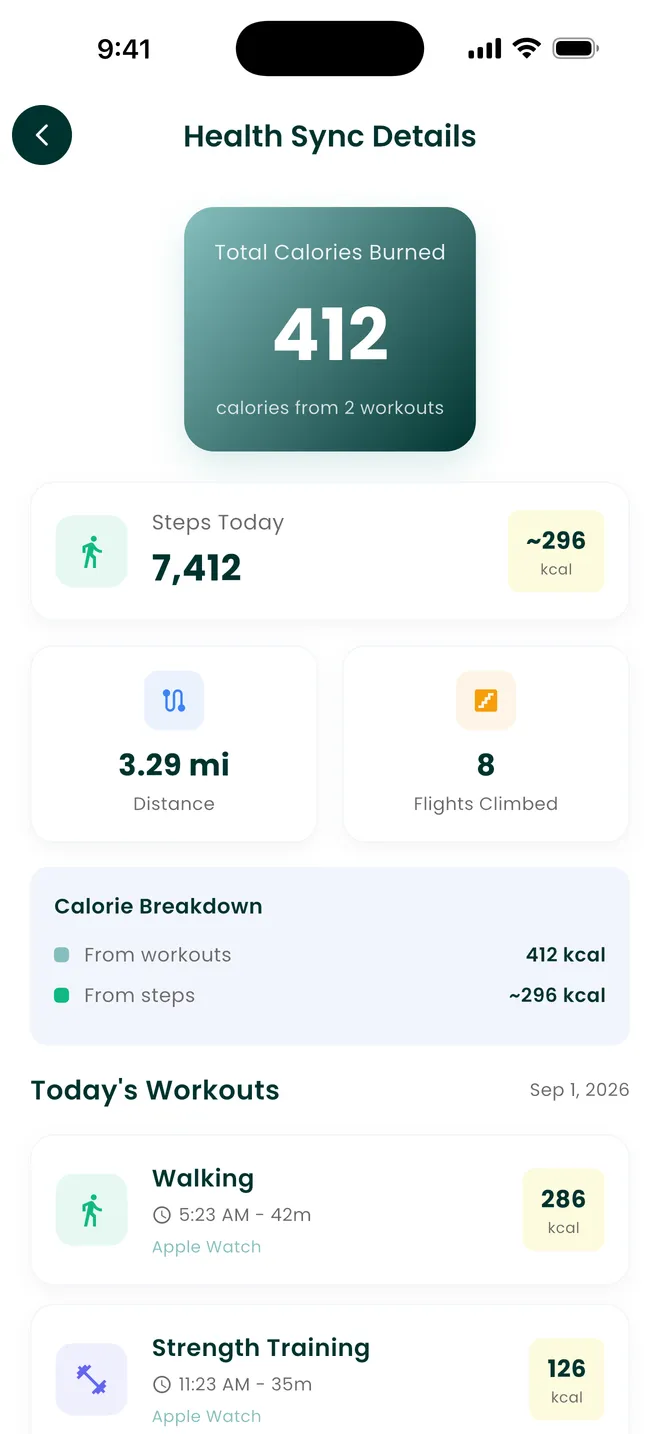
Your activity counts itself
Steps, workouts and distance, straight from Apple Health
Why Nutrify specifically
Built for this, not bolted on
Automatic two-way sync
Food logged in Nutrify flows to Apple Health. Activity from your watch flows back to Nutrify. No manual exports.
Calorie targets that reflect reality
Nutrify reads your actual activity and adjusts your daily calorie budget based on what you burned, not a static estimate.
One health record
Nutrition, steps, heart rate, weight, sleep, connected and visible in one place.


What flows in, and what it changes
Nutrify reads steps, active energy, distance, flights climbed and workouts from the health platform, which means a day where you walked ten kilometres does not look identical to a day at a desk. That activity feeds your calorie budget, so what you have left to eat reflects the day you actually had rather than a fixed number set during onboarding. Weight recorded by a connected scale comes in the same way. The practical benefit is that the two things people most often forget to enter, steps and weight, are the two things a phone and a scale already record without being asked.
The Android integration is narrower than the iOS one, and we should say so
On iOS, nutrition logged in Nutrify is written to Apple Health, so other apps can read your calories and macros. On Android, Health Connect nutrition writing is not supported by Nutrify, so food logged in the app stays in the app. Steps, distance and floors are effectively iOS-only too, which comes down to the permission scopes we are able to ship on Android rather than anything about the code. Water syncs in both directions on both platforms. If you are on Android and the reason you are choosing a tracker is pushing nutrition into Health Connect for something else to read, this is not the app for that today, and there is no point discovering that after the install.
Google Fit is not the Android platform any more
A lot of app listings, this page included until recently, still say Google Fit, because that is what people search for. Google has moved Android health data to Health Connect, which is built into recent Android versions and installable on older ones, and Fit's APIs have been wound down. Practically this means the thing you grant permission to on Android is Health Connect, and the toggles you are looking for live there rather than in a Google Fit account. If your watch or fitness app writes to Health Connect, Nutrify can read it. If it only writes to its own cloud, it cannot, regardless of what either of us would prefer.
Burned calories are estimates, and eating them all back is a choice
Active energy from a watch is a model, not a measurement, and the models are generally more confident than they should be, particularly for walking and for anything involving carrying weight. Nutrify reads what the platform reports, because inventing our own number would be no better. What you do with it is a decision worth making deliberately: if your burn figures run high and you eat every one of them back, the deficit you think you have may not exist. A reasonable habit is to treat activity as a reason your budget moved rather than as permission it granted, and to judge it against your weight trend over a few weeks.
Duplicates, and why they happen
The classic health platform problem is one activity appearing twice, once from the phone's own step counter and once from the watch or app that also recorded it. Platforms de-duplicate some of this and not all of it, and third party apps that write generously make it worse. Nutrify matches entries by their source so that something recorded in both places is counted once rather than twice, which is the same approach used for water. If a total still looks inflated, the usual cause is two apps writing the same workout under different names, and the fix is in the platform's data source settings rather than in Nutrify.
What users say
Reviews from the App Store
I've been through at least 6 food trackers and this one is the keeper. Just started GLP-1, you find out really quickly that you need to track your nutrients, and this app tracks everything I need: protein, fiber, carbs, calories, weight progress. It specifically supports a GLP-1 diet nutrient focus (gives you the choice of several other diets too). The interface is super easy, take a photo of your food, the AI nutrients estimates are very accurate. And important for GLP-1 users, it lets you adjust your meal based on actual consumption ( because you know you can never finish your whole meal).
Nutrify has been such a huge part of me getting my life back on track. I'm on a weight‑loss and diabetes journey, and for many I felt like I didn't having any direction and hoping for the best. This app finally gave me something solid to hold onto. I LOVE the analytics! It actually helps me understand my food, my numbers, and my habits in a way that makes sense to me. I can see what's helping, what is not, and what I need to adjust without feeling judged or self-conscious about it.
I am an advanced user of intermittent fasting and have tried practically all serious applications of its kind. I tried Nutrify for a while and it seems to me that they have done an excellent job and a fairly complete vision of what the habits mean that we all seek to improve our nutrition. They are doing better than many veteran Apps like LoseIt and Cronometer!
FAQ
Apple Health & Google Fit questions, answered
Yes, in both directions on iOS. Nutrify reads steps, active energy, distance, flights and workouts from Apple Health, and writes your nutrition and water back to it. Permissions are granted per data type when you connect, so you can share activity without sharing anything else.
The Android health platform is now Health Connect, which replaced Google Fit, and that is what Nutrify connects to. If you are looking for a Google Fit toggle you will not find one, because the APIs behind it have been wound down by Google rather than dropped by us.
No. Writing nutrition out is iOS-only. Food logged in Nutrify on Android stays in Nutrify rather than being written to Health Connect. Water syncs both ways on both platforms. If your reason for choosing a tracker is getting calories and macros into Health Connect for another app to read, this is a real limitation and worth knowing before you install.
Steps, distance and floors are effectively iOS-only in Nutrify. This is down to the permission scopes available to the app on Android rather than a setting you can fix, so if step-driven calorie adjustment is central to how you track, the iOS version does more here than the Android one.
Yes, where activity data is available. Nutrify reads active energy and workouts and reflects them in what you have left for the day. Treat those figures as estimates from the device that produced them, because watch burn models are approximations, and check the result against your weight trend over a few weeks rather than trusting any single day.
They should not be. Entries are matched on their source so an activity recorded by both your phone and your watch is counted once. If a total still looks too high, it is usually two apps writing the same session under different names, which is fixed in the health platform's own data source settings.
No. Everything in the app works without connecting, and you can log exercise manually. The connection saves you entering things your phone or watch already recorded, which mostly matters for steps and weight, the two entries people forget most reliably.
Yes. Permissions are managed by the health platform rather than by Nutrify, so you revoke them in Apple Health or Health Connect and the sync stops. Your existing Nutrify data stays where it is.
Indirectly, if those apps write to Apple Health or Health Connect. Nutrify reads whatever is in the platform rather than integrating with each device individually, so the question to ask is whether your device's app writes to the platform on your phone. Most major ones do, though what they write varies.
And you also get
Apple Health & Google Fit is one piece of it.
Every Nutrify user gets the full app: AI food recognition, analytics, health integrations, and everything below.
Exercise Tracking
Exercise changes what your body needs. Nutrify tracks your workouts and adjusts your calorie targets automatically, so you know exactly how much to eat without under or overfueling.
Water Tracking
Logging water shouldn't require opening an app and navigating three screens. One tap, done. Nutrify keeps your hydration tracking as effortless as drinking the water itself.
Home Screen Widget
Calories remaining, macros, water, visible the moment you pick up your phone. No opening the app. No extra taps. Just constant, effortless awareness.
Body Measurements
Weight fluctuates by 2-3 pounds day to day from water alone. Body measurements tracked consistently over weeks show what's actually changing, and how your nutrition is driving it.
Nutrition Analytics
Nutrify's analytics show your nutrition trends over days, weeks, and months, so you can see what's actually working, what's not, and where the gaps are.
Keep reading
Ready to try Apple Health & Google Fit?
Free to download. Every feature free for 7 days, and you can cancel any time.