
The water tracking app people actually stick with.
Logging water shouldn't require opening an app and navigating three screens. One tap, done. Nutrify keeps your hydration tracking as effortless as drinking the water itself.
The short answer
Nutrify tracks water in one tap from the app or a home screen widget, counts coffee, tea and juice toward your total, syncs both ways with Apple Health and Health Connect, and sends reminders on a schedule you set. It is free on iOS and Android, and hydration sits in the same app as your food, so you are not running a second tracker to see one number.
Why it matters
Most adults are chronically underhydrated without knowing it. Thirst is a delayed signal: by the time you feel it, you're already mildly dehydrated. The effects are subtle but real: reduced concentration, lower energy, worse workout performance, and increased hunger that gets mistaken for a need to eat. Tracking water intake isn't about hitting an arbitrary eight-glass target. It's about building awareness of your actual hydration habits and understanding how hydration connects to how you feel and perform each day. The apps that succeed at this are the ones that make it frictionless enough to actually do every day.
What is a water tracking app?
A water tracking app records how much you drink during the day and compares it against a daily target. The good ones do three things: make logging fast enough that you actually do it, let you record more than plain water, and keep a history so you can see whether your intake is genuinely improving or just felt like it did on a good day. Targets are usually derived from body weight, activity level and climate rather than the old eight-glasses rule, which was never based on evidence. The main thing separating apps in this category is friction. Hydration is logged six to ten times a day, far more often than meals, so a flow that takes five seconds instead of one is the difference between a habit that lasts and one abandoned inside a fortnight.
How it works in Nutrify
Simple enough to actually do every day
Set your daily goal
Choose a target or let Nutrify calculate one based on your weight, activity level, and climate.
Log every time you drink
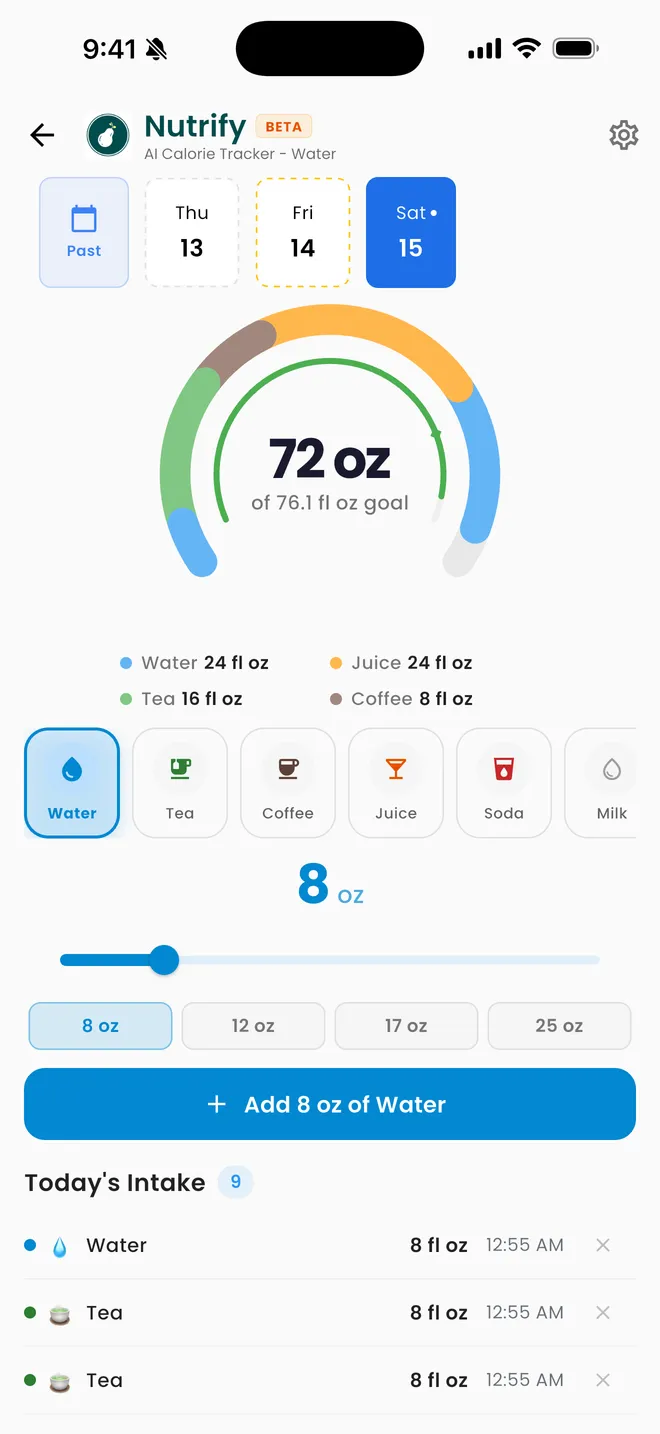
Tap a preset, drag the slider, or type an exact amount. Water, coffee, tea and juice each get their own colour on the ring.
See your hydration patterns
Check your daily progress and weekly trend to understand when you consistently fall short and adjust.
Hydration you actually keep up
One tap a glass, with reminders that fit your day
Why Nutrify specifically
Built for this, not bolted on
One-tap logging, no friction
Add 250ml, 500ml, or any custom amount in a single tap. The faster it is, the more likely you are to actually do it.
Reminders that fit your schedule
Set reminders at intervals that work for you, not generic hourly pings that you'll ignore within a week.
Connected to your full health picture
Your hydration data sits alongside your food, activity, and body metrics so you can see how water intake connects to everything else.


Coffee and tea count. There is no penalty coefficient.
A lot of hydration apps either refuse to log coffee and tea, or log them at a discount on the theory that caffeine is dehydrating. The research does not support that: for habitual drinkers, caffeinated drinks in normal amounts hydrate you at roughly the same rate as water. Nutrify records water, coffee, tea and juice each at their full volume, colour-coded separately on the daily ring, so you can see the composition of your intake without being quietly penalised for how you got there. If you want to drink less coffee, the breakdown shows you how much of your day it is; the app does not make that decision for you by fudging the arithmetic.
Typed amounts, not just preset buttons
Preset buttons are fast until your glass is not 250ml. Nutrify gives you presets for the amounts you drink constantly, a slider for something in between, and a typed entry for when you know the exact number, such as a labelled 600ml bottle or the 330ml can in your hand. Units follow whatever you have set elsewhere in the app, so you are logging in fl oz or ml without converting anything in your head.
Hydration stays hydration
Drinks you log in the water tracker do not silently reappear as calories in your food diary. That sounds obvious, but plenty of trackers either double-count a latte across both screens or force you to log it twice to get credit in each. In Nutrify the two are deliberately separate: the water tracker answers "did I drink enough", the food diary answers "what did I eat". If you want the calories from a drink counted, you log it as food, and it will not distort your hydration ring.
Reminders you set, not pings you learn to swipe away
Hourly notifications from 8am to 10pm are why most people turn hydration reminders off in week two. Nutrify lets you choose the window and the spacing, so the prompts land during your actual waking hours and stop when you are asleep. Reminders are local notifications, which means they fire without the app needing to phone home and without your drinking habits leaving your device to schedule them.
Two-way Apple Health and Health Connect sync
Water logged in Nutrify is written to Apple Health on iOS and Health Connect on Android, and water logged elsewhere is read back in, so a smart bottle or another app that already has your day does not leave you with two disagreeing totals. Entries are matched on their source so a drink recorded in both places is counted once rather than twice.
What users say
Reviews from the App Store
• If you are doing intermittent fasting or just trying to eat decently, this app is for you. • If you want to take a pic of your meal, instead of looking up every part of it, this app is for you. • If you want to track your exercise and measurements progress, this app is for you. • If you want to track your water intake, this app is for you. Yes, Nutrify Tracker does all of those things and more.
I've been through at least 6 food trackers and this one is the keeper. Just started GLP-1, you find out really quickly that you need to track your nutrients, and this app tracks everything I need: protein, fiber, carbs, calories, weight progress. It specifically supports a GLP-1 diet nutrient focus (gives you the choice of several other diets too). The interface is super easy, take a photo of your food, the AI nutrients estimates are very accurate. And important for GLP-1 users, it lets you adjust your meal based on actual consumption ( because you know you can never finish your whole meal).
Nutrify has been such a huge part of me getting my life back on track. I'm on a weight‑loss and diabetes journey, and for many I felt like I didn't having any direction and hoping for the best. This app finally gave me something solid to hold onto. I LOVE the analytics! It actually helps me understand my food, my numbers, and my habits in a way that makes sense to me. I can see what's helping, what is not, and what I need to adjust without feeling judged or self-conscious about it.
FAQ
Water Tracking questions, answered
The one whose logging flow you will still be using in a month. Practically, look for one-tap logging from outside the app, support for drinks other than plain water, reminders you can schedule yourself, and sync with Apple Health or Health Connect so you are not maintaining a separate silo of data. Nutrify does all four and is free on both platforms, with the advantage that your hydration sits next to your food and weight rather than in a separate app.
Yes. For regular coffee drinkers, caffeinated drinks in normal quantities contribute to daily fluid intake at close to the same rate as water. The mild diuretic effect of caffeine is more than offset by the volume of liquid you are drinking. Nutrify counts coffee at full volume and shows it as its own colour on the ring so you can still see how much of your intake it makes up.
Common guidance is around 2.7 litres a day for women and 3.7 for men from all sources including food, but the useful number depends on your body weight, how much you sweat, and your climate. Our free water intake calculator gives you a target from those inputs without needing to sign up, and you can set that figure as your goal in the app.
Nutrify is free to download on iOS and Android, and water tracking is covered by the same subscription as everything else rather than sold as an add-on. Every feature is open during the 7-day trial; after that it is a paid app, and you can cancel any time.
Yes. The home screen widget lets you add a drink with one tap from your phone home screen, which matters because hydration gets logged far more often than meals and every extra screen is a chance to not bother.
Yes, in both directions. Water you log in Nutrify is written to Apple Health on iOS and Health Connect on Android, and water logged by another app or a connected bottle is read back into Nutrify. Entries are de-duplicated by source, so a drink that exists in both places is only counted once.
No. The water tracker is hydration only. A latte logged there counts toward your fluid goal and nothing else. If you want its calories counted you log it as food as well, and that will not double-count against your hydration.
Yes. Water follows the unit preference you set in the app, so you can log and see your goal in fl oz or ml, and switching later converts your history rather than resetting it.
And you also get
Water Tracking is one piece of it.
Every Nutrify user gets the full app: AI food recognition, analytics, health integrations, and everything below.
Supplement Logging
Supplements only work when you take them consistently. Nutrify logs every supplement alongside your food, tracks your streak, and reminds you before you forget, again.
Intermittent Fasting
Tracking a fasting window without tracking what you eat in it is only half the picture. Nutrify connects your IF schedule to your nutrition data, so you know you're fasting and fueling right.
Home Screen Widget
Calories remaining, macros, water, visible the moment you pick up your phone. No opening the app. No extra taps. Just constant, effortless awareness.
Apple Health & Google Fit
Nutrify syncs with Apple Health and Google Fit so your food data and activity data live together. Your calorie targets adjust automatically based on what you actually burned.
Body Measurements
Weight fluctuates by 2-3 pounds day to day from water alone. Body measurements tracked consistently over weeks show what's actually changing, and how your nutrition is driving it.
Keep reading
Ready to try Water Tracking?
Free to download. Every feature free for 7 days, and you can cancel any time.