
The intermittent fasting app that connects your fast to your food.
Tracking a fasting window without tracking what you eat in it is only half the picture. Nutrify connects your IF schedule to your nutrition data, so you know you're fasting and fueling right.
The short answer
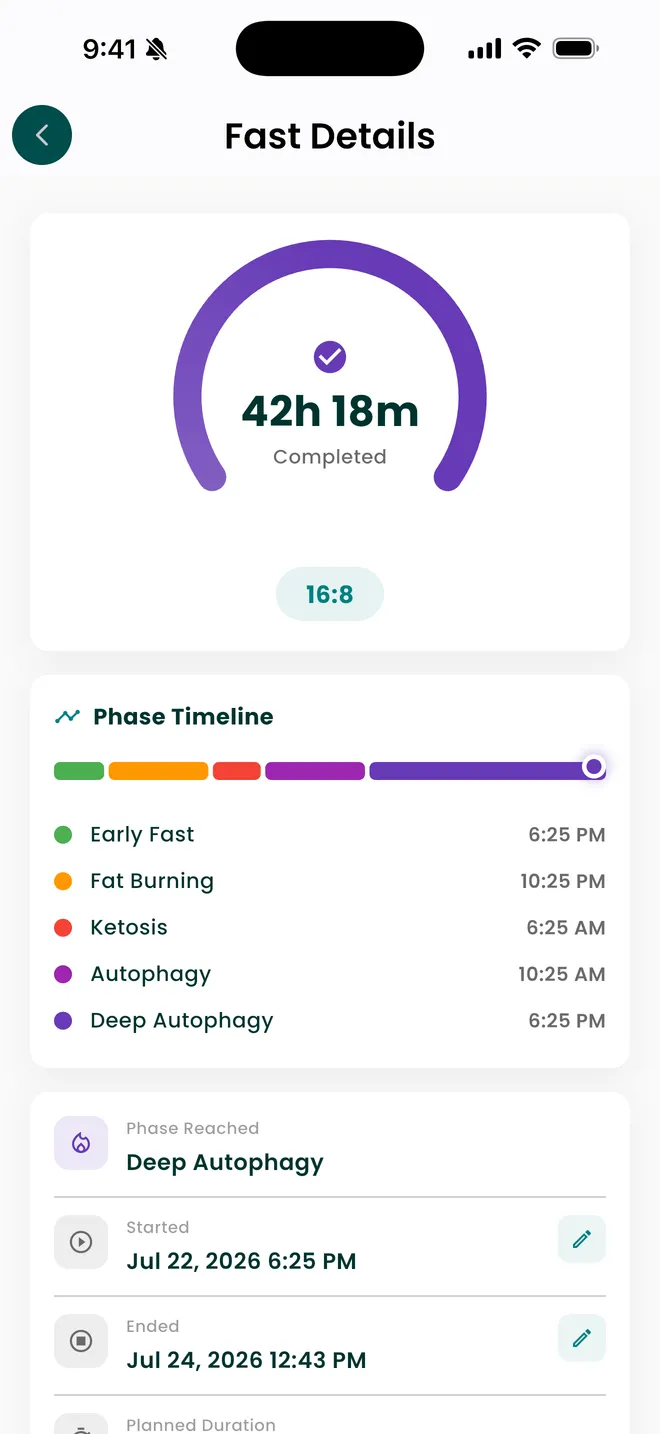
Nutrify runs a fasting timer with a phase timeline, early fast, fat burning, ketosis, autophagy and deep autophagy, each stamped with the time you reached it. Completed fasts are recorded with their duration, such as 42h 18m, and build a fasting history and analytics view. Fasting is free on iOS and Android; the AI reading of your fasting data is part of the paid tier. Because the timer lives inside the food tracker, your window and what you eat in it are in the same place.
Why it matters
Intermittent fasting works for many people, but not for the reasons most people think. It's not magic. The benefit comes primarily from naturally reducing calorie intake by restricting the eating window, and in some people, from improved insulin sensitivity over time. Where IF goes wrong is when the eating window becomes a free-for-all, or when the fast is too aggressive and people undereat to the point of muscle loss and metabolic slowdown. The difference between IF working and not working is almost always in the quality and quantity of what happens during the eating window, which means fasting tracking and nutrition tracking need to work together.
What is intermittent fasting tracking?
Intermittent fasting means eating within a limited window and not eating outside it. The common patterns are named by hours: 16:8 is a sixteen hour fast and an eight hour window, 18:6 and 20:4 shorten the window further, and OMAD compresses it to a single meal. 5:2 is a different animal, since it restricts calories on two days rather than restricting hours. Tracking a fast means starting a clock when you stop eating and stopping it when you start again, which sounds trivial until you try to reconstruct a week of it from memory. A fasting tracker exists for three reasons: it removes the arithmetic of working out when your window opens, it keeps a history so you can see whether you are doing the protocol you say you are doing, and it separates the hours from the food, which are two very different claims that people routinely conflate.
How it works in Nutrify
Simple enough to actually do every day
Set your fasting schedule
Choose your eating window and daily start time. 16:8, 18:6, or custom, whatever fits your life.
Track your fast in real time
Nutrify shows you where you are in your fast and when your eating window opens.
Log meals during your window
Track what you eat when you eat, so you know your IF is working nutritionally, not just mechanically.
Watch your body burn fat
A fasting timer with live fat-burn and ketosis zones
Why Nutrify specifically
Built for this, not bolted on
Real-time fast tracking
See exactly how far into your fast you are and when your eating window opens. No mental math, no guessing.
Know what to eat when you break your fast
Nutrify shows your remaining calories and macros for your eating window so you fuel correctly, not just fast correctly.
Works with any IF protocol
16:8, 18:6, OMAD, 5:2, set any eating window that works for your schedule and goals.


The phase timeline is a convention, not a reading from your body
Nutrify shows a fast as a series of named phases, early fast, fat burning, ketosis, autophagy and deep autophagy, and stamps the time you crossed each one. Those crossings are calculated from elapsed hours. They are not measurements. No phone can see your blood ketones, and nothing on the consumer market can observe autophagy in a living person. The hour marks used across fasting apps come from a popularised timeline that varies between sources, and the underlying physiology varies with your last meal, your training, your activity and your metabolism. Treat the timeline as a map of the protocol you are following, useful for pacing and for knowing roughly where you are, rather than as a report on what your cells are doing.
A timer that cannot see your food is measuring half the thing
The failure mode of intermittent fasting is almost never the fast. It is the window. Compressing eating into six hours only reduces intake if those six hours do not expand to fill the gap, and it only protects muscle if protein still lands somewhere inside them. A standalone fasting app cannot see any of that. It knows you fasted seventeen hours and nothing else. Nutrify runs the timer inside the food tracker, so the fast and the meals that ended it share one history and one analytics view. That pairing answers the question that actually matters, which is not "did I fast" but "did fasting change what I ate".
Long fasts get recorded, not applauded
The app will record a 42h 18m fast, because that is what happened and a log that quietly rounds reality away is worthless. It does not treat length as a score or hand you a badge for it. Extended fasting is the point where fasting stops being a scheduling choice and becomes a medical one, particularly if you take medication that affects blood sugar, are pregnant or breastfeeding, or have any history of disordered eating. That is a conversation with a clinician before it is a setting in an app. It is the only piece of advice on this page; everything else here is a description of what the software records.
The history is worth more than the live timer
A running timer is satisfying and tells you very little. What changes behaviour is the record: how many fasts you completed this month, how long they actually ran against how long you intended, and which days consistently fall apart. Nutrify keeps completed fasts with their durations and a fasting analytics view built on that history. Four solid sixteen hour fasts and three days of grazing is a real and fixable pattern, and it is completely invisible while you are watching the current clock tick. Completion rate across weeks is the number to watch, not the largest single fast you have ever posted.
One subscription, not a fasting tier on top of it
The timer, the phase timeline, the completed fast records, the history, the fasting analytics and the AI fasting insights are all on the same subscription. None of it is sold separately or held back for a higher tier. That is worth saying because the usual arrangement in this category is a timer that runs free for a week and then locks, or insights parcelled off into a second tier above the one you already pay for. Nutrify is free to download and every feature is open during the 7-day trial. After the trial it is a paid app, and one subscription covers all of it.
What users say
Reviews from the App Store
I am an advanced user of intermittent fasting and have tried practically all serious applications of its kind. I tried Nutrify for a while and it seems to me that they have done an excellent job and a fairly complete vision of what the habits mean that we all seek to improve our nutrition. They are doing better than many veteran Apps like LoseIt and Cronometer!
• If you are doing intermittent fasting or just trying to eat decently, this app is for you. • If you want to take a pic of your meal, instead of looking up every part of it, this app is for you. • If you want to track your exercise and measurements progress, this app is for you. • If you want to track your water intake, this app is for you. Yes, Nutrify Tracker does all of those things and more.
I've tried it all and ended up here. An uncluttered and easy use app which helped me restructure my weight loss to background noise. Organises and tracks every health initiate from supplements to exercise and fasting. AI refinement and photo analysis of my food logs. Less effort and time from me to get results. I purchased the lifetime access and after 2 months and a steady 6 kg loss which I barely committed to, I'm thrilled I made that choice
FAQ
Intermittent Fasting questions, answered
Nutrify is free to download on iOS and Android and every feature, fasting included, is open during the 7-day trial. After the trial it is a paid app — there is no permanently free tier, and we would rather say so here than have you find out on day eight. What Nutrify does not do is gate fasting separately: the timer, phase timeline, completed fast history, analytics and AI insights are all on the one subscription, where most fasting apps lock the timer after a trial and sell the readings as a further upgrade.
You eat within an eight hour window and do not eat for the other sixteen, usually by skipping breakfast or stopping earlier in the evening. It is popular because it maps onto a normal day without much planning: finish dinner at 8pm, eat again at midday. The hours themselves are arbitrary. What matters is whether the shorter window changes how much you actually eat, which is why it is worth tracking food and hours together.
By the usual convention, anything with meaningful calories restarts the clock, and water, black coffee and plain tea do not. The grey area is everything with a small number of calories: milk in coffee, sweeteners, gum, supplements taken with food. There is no single agreed threshold, so pick a rule, apply it consistently, and record it the same way every time. An inconsistent rule makes your own history impossible to compare.
Nobody can give you an honest hour figure for your body. The numbers circulating online come from a mix of animal work and small human studies, and they vary widely between sources. Nutrify marks an autophagy phase on the timeline because that is the convention fasting protocols use, and it is calculated from elapsed hours, not measured. Treat it as a marker on a map rather than a biological event the app has detected.
No. Ketosis is measured with a blood, breath or urine test. A phone can only calculate how long it has been since you last ate and label that with the phase names the protocol uses. Nutrify shows a ketosis phase for that reason, and it is an estimate from the clock. If you need to know your actual ketone level, you need a meter, not an app.
Yes, and that is most of the reason to use Nutrify for fasting rather than a dedicated timer. Your fast, the meal that broke it, your macros for the window and your weight trend all sit in the same history. That lets you check the thing a timer alone never can: whether your eating window is genuinely smaller in calories or just shorter in hours.
The timer records elapsed hours, so any protocol defined by a window works, including OMAD and longer variants. 5:2 is not a window protocol at all. It restricts calories on two days a week, so it lives in your food log and your weekly analytics rather than in the timer. You can run both if you want, but they answer different questions.
The mechanism usually given is straightforward: a shorter eating window makes it harder to fit as much food into the day, so intake drops without deliberate counting. It is not a loophole around total intake, and it stops working the moment the window fills up. That is exactly why a fasting timer on its own is weak evidence of progress, and why it is worth tracking the food alongside the hours.
And you also get
Intermittent Fasting is one piece of it.
Every Nutrify user gets the full app: AI food recognition, analytics, health integrations, and everything below.
Nutrition Analytics
Nutrify's analytics show your nutrition trends over days, weeks, and months, so you can see what's actually working, what's not, and where the gaps are.
Meal Logging
Most food diary apps fail because logging a meal takes longer than eating it. Nutrify flips that: photo, voice, barcode, or text, your meal is logged before you put down your fork.
Water Tracking
Logging water shouldn't require opening an app and navigating three screens. One tap, done. Nutrify keeps your hydration tracking as effortless as drinking the water itself.
Health Score
Hitting your calorie target doesn't mean you're eating well. Nutrify's Health Score looks at your full diet (fiber, protein, sugar, micronutrients) and gives you an honest number.
Exercise Tracking
Exercise changes what your body needs. Nutrify tracks your workouts and adjusts your calorie targets automatically, so you know exactly how much to eat without under or overfueling.
Keep reading
Ready to try Intermittent Fasting?
Free to download. Every feature free for 7 days, and you can cancel any time.