
Don't just see the total. See what's in it.
Knowing your meal has 600 calories is one thing. Knowing it's the dressing, not the chicken, that's adding 300 of them, that's the information that actually changes what you order next time.
The short answer
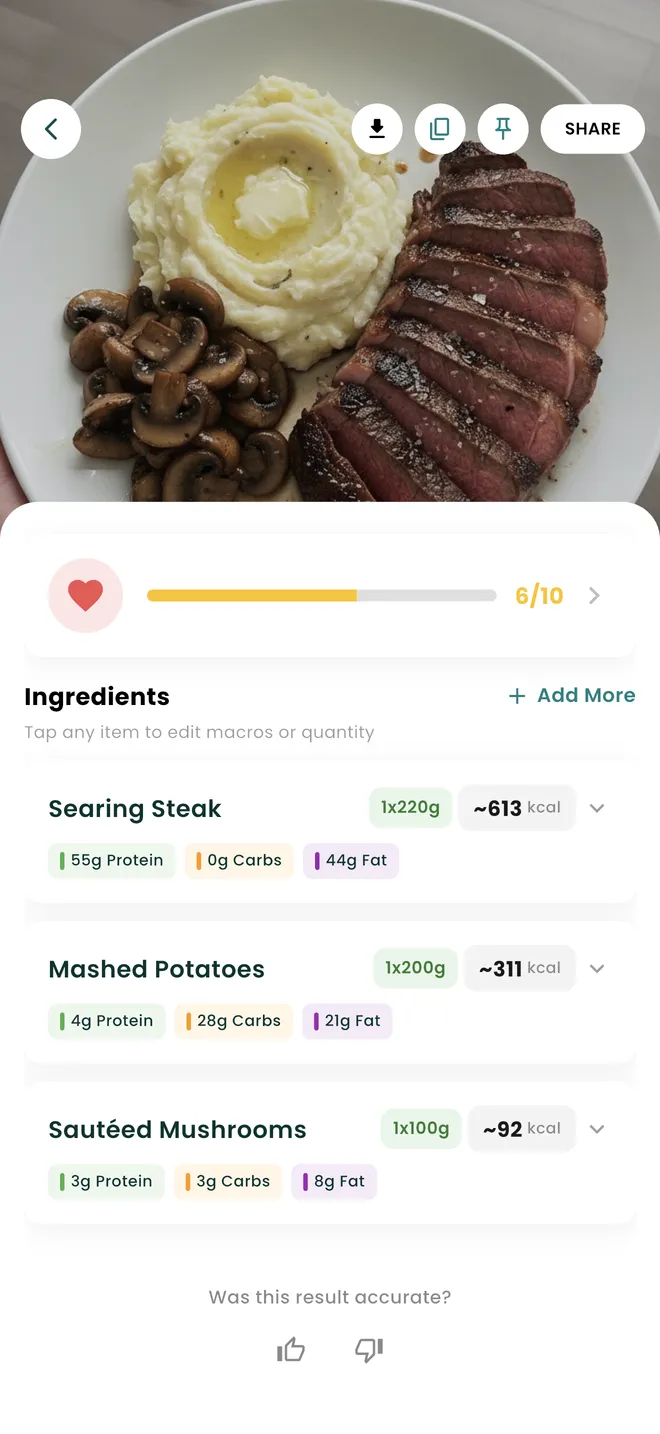
Nutrify splits every logged meal into its ingredients and gives each one its own quantity and its own calories, protein, carbs and fat, so you can see which component is actually driving the total. Every line is editable on its own, and the meal totals recalculate as you change it. The same screen carries fibre and sugar, glycemic index and glycemic load, a Nutrify Score out of 10, and an expandable Additional Nutrients grid covering around twenty micronutrients.
Why it matters
Most nutrition apps give you a total calorie number for a meal and call it done. But a total doesn't tell you anything useful about how to eat better. If your lunch is 800 calories, is that the protein keeping you full, or the oil your food was cooked in? Is the carb load coming from the rice or the sauce? Ingredient-level visibility is what turns data into decisions. When you can see exactly what each component contributes, you stop guessing and start making specific, informed choices, like asking for dressing on the side, or swapping one ingredient to shift the protein-to-calorie ratio.
What is an ingredient breakdown in a nutrition app?
An ingredient breakdown attributes a meal's nutrition to its individual components rather than reporting one figure for the whole plate. Instead of "steak dinner, 980 calories", you get the steak, the mashed potato, the butter it was mashed with and the sauce, each with its own weight and its own macros. It matters because composite dishes hide their calories unevenly. Two plates with identical totals can be built completely differently, one from protein and vegetables and one from oil and refined carbohydrate, and only a breakdown tells them apart. It is also the only practical way to fix a wrong estimate. A single total can be accepted or rejected, but a list of parts can be corrected in the one place it is wrong, which is the difference between adjusting a meal and re-logging it.
How it works in Nutrify
Simple enough to actually do every day
Log your meal
Add a meal by photo, text, or build it ingredient by ingredient manually.
Tap to see by ingredient
Open any logged meal and see each ingredient's individual nutrition contribution.
Adjust and save
Edit portions, swap items, and save as a custom meal for next time.
See what is driving the calories
Micronutrients, a quality score, and every ingredient broken out
Why Nutrify specifically
Built for this, not bolted on
Component-level clarity
See what each ingredient contributes, so you know if it's the sauce, the protein, or the sides that are adding up.
Edit any ingredient
Adjust quantities or swap ingredients and watch the totals update in real time. Build the meal that actually fits your goals.
Works on home cooking
Build any meal from scratch ingredient by ingredient. Nutrify handles the math so you don't have to.


Fat is where the calories concentrate, and fat is what you cannot see
Protein and carbohydrate carry roughly four calories per gram. Fat carries about nine. That single ratio explains most of the surprise in a breakdown, because the ingredients that dominate a total are almost never the ones that dominate the plate visually. A tablespoon of dressing can outweigh the leaves it is sitting on. The oil a vegetable was roasted in can be a larger line than the vegetable. When you only see the total, that arithmetic stays invisible and the natural conclusion is that the meal itself was too big. When you see the components, the actual lever is obvious, and it is usually one item rather than the whole dish.
The ingredient list is how you repair an estimate instead of rejecting it
A photo-based estimate is a series of judgements about what is on the plate and how much of each thing there is. Some of those judgements will be right and one or two will be off. If the app hands you a single number, a partial error forces you to discard the whole entry. Nutrify keeps every ingredient separate with its own quantity, so when the chicken is right and the rice is double what you actually had, you change the rice. The totals, macros and score follow. For readings that are wrong at a more basic level, AI Refine lets you describe the meal in your own words and regenerates the whole breakdown.
Cooking fat is the ingredient almost nobody logs
Ask someone what was in their stir fry and you will get the protein, the vegetables and the sauce. You will very rarely get the oil, even though it is often the single biggest calorie contributor in the pan. The same goes for the butter in scrambled eggs, the oil brushed on a grill and the fat a restaurant kitchen uses far more freely than a home cook would. Because Nutrify's breakdown is an editable list rather than a fixed result, adding the missing line is a few seconds of work. It is also the single highest-value correction most people can make, since it is systematic. Miss it once and you have missed it every day.
Glycemic load is the number that accounts for how much you actually ate
Glycemic index rates a carbohydrate food on how quickly it raises blood glucose, but it says nothing about quantity, which is why a food with a high index can be irrelevant if you eat a small amount of it. Glycemic load combines the index with the carbohydrate actually present in your portion, so it is the more useful of the two when you are looking at a real plate. Nutrify shows both on the food detail screen alongside fibre and sugar, plus a Nutrify Score out of 10 as a quick overall read and an expandable Additional Nutrients grid, currently in beta, covering around twenty micronutrients including sodium, potassium, iron, magnesium and vitamins A, C, D and B12.
The point is one substitution, not a new diet
Breakdowns are usually sold as information, but their real use is narrowing a decision. If your lunch reads high and the list shows the dressing accounting for a third of it, you have a change you can make on Thursday without altering anything else about how you eat. If the protein is low and the ingredient list shows why, you know which line to grow rather than which meal to abandon. This is a smaller and more durable kind of adjustment than restructuring your diet. It also survives contact with real life, because it does not depend on cooking differently, only on ordering or serving one component differently.
What users say
Reviews from the App Store
I've been through at least 6 food trackers and this one is the keeper. Just started GLP-1, you find out really quickly that you need to track your nutrients, and this app tracks everything I need: protein, fiber, carbs, calories, weight progress. It specifically supports a GLP-1 diet nutrient focus (gives you the choice of several other diets too). The interface is super easy, take a photo of your food, the AI nutrients estimates are very accurate. And important for GLP-1 users, it lets you adjust your meal based on actual consumption ( because you know you can never finish your whole meal).
Nutrify has been such a huge part of me getting my life back on track. I'm on a weight‑loss and diabetes journey, and for many I felt like I didn't having any direction and hoping for the best. This app finally gave me something solid to hold onto. I LOVE the analytics! It actually helps me understand my food, my numbers, and my habits in a way that makes sense to me. I can see what's helping, what is not, and what I need to adjust without feeling judged or self-conscious about it.
I am an advanced user of intermittent fasting and have tried practically all serious applications of its kind. I tried Nutrify for a while and it seems to me that they have done an excellent job and a fairly complete vision of what the habits mean that we all seek to improve our nutrition. They are doing better than many veteran Apps like LoseIt and Cronometer!
FAQ
Ingredient Breakdown questions, answered
Open the logged meal and look at the ingredient list, where each component shows its own quantity and its own calories and macros. The list makes the ranking immediate rather than something you have to reconstruct. In most composite dishes the answer is a fat, so oils, butter, dressings, cheese and sauces are the first places to look before you assume the portion size was the problem.
Yes. Every ingredient carries its own quantity and can be changed on its own, and the meal totals, macros and score update from the edited list. You can also add an ingredient that was missed, which is the usual fix for cooking oil and other things the camera cannot see. If the whole estimate needs redoing, AI Refine takes a plain-language description and rebuilds it.
Glycemic index scores a carbohydrate food on how quickly it raises blood glucose, independent of how much you eat. Glycemic load takes that score and applies it to the carbohydrate in your actual portion, which makes it the more practical figure for a real meal. A high-index food eaten in a small quantity can have a modest load. Nutrify shows both on the food detail screen.
Nutrify breaks each logged meal into an ingredient list with per-item quantities and macros, whether the meal came from a photo, a spoken description, a typed one or an imported recipe. Apps built around database matching typically return a single entry per food, so a composite dish arrives as one row you either accept or replace, with no way to correct a single component.
Either photograph the finished plate and correct the ingredient list, or import it as a recipe from a URL, a photo or the ingredients themselves and set the number of servings. The recipe route is better for anything you cook more than once, because the breakdown is saved to your library and future logs are a single tap with the per-serving maths already done.
Yes. Under the macros there is an expandable Additional Nutrients section, currently marked beta, with around twenty micronutrients including saturated, trans, monounsaturated and polyunsaturated fat, omega-3, sodium, potassium, calcium, iron, magnesium, zinc, folate and vitamins A, C, D, E, K, B1 and B12. It is collapsed by default so the main screen stays readable.
Because the composition differs. Protein and fibre influence how full a meal leaves you, and the carbohydrate type and amount, captured by glycemic load, influence the blood glucose response. Two 700-calorie plates, one built from protein and vegetables and one from refined carbohydrate and oil, are the same number and a different experience. The ingredient breakdown is what makes that difference visible.
Yes. Each item in the breakdown is its own line with its own quantity and macros, so you can read it in isolation, change its amount to see what a bigger or smaller portion would look like, or remove it entirely to see what the meal would be without it. That last one is the quickest way to test a substitution before you commit to it.
And you also get
Ingredient Breakdown is one piece of it.
Every Nutrify user gets the full app: AI food recognition, analytics, health integrations, and everything below.
Meal Logging
Most food diary apps fail because logging a meal takes longer than eating it. Nutrify flips that: photo, voice, barcode, or text, your meal is logged before you put down your fork.
Recipe Import
Paste a recipe URL or enter ingredients and Nutrify gives you exact calories and macros per serving. Cooking at home should count, and now it does.
Health Score
Hitting your calorie target doesn't mean you're eating well. Nutrify's Health Score looks at your full diet (fiber, protein, sugar, micronutrients) and gives you an honest number.
Nutrition Analytics
Nutrify's analytics show your nutrition trends over days, weeks, and months, so you can see what's actually working, what's not, and where the gaps are.
Photo Food Journal
Numbers tell you what. Photos show you why. A visual food diary makes patterns obvious in a way that calorie totals never do, and logging it is as simple as taking the photo.
Keep reading
Ready to try Ingredient Breakdown?
Free to download. Every feature free for 7 days, and you can cancel any time.