
Turn any recipe into a nutrition label.
Paste a recipe URL or enter ingredients and Nutrify gives you exact calories and macros per serving. Cooking at home should count, and now it does.
The short answer
Nutrify imports a recipe from a URL, a photo or a plain list of ingredients, works out the nutrition of the whole dish, and divides it by the number of servings you tell it the recipe makes. Every ingredient stays as its own editable line, so you can fix a quantity or add the oil the recipe forgot to mention. The finished recipe is saved to your library and logged with one tap every time you cook it again.
Why it matters
Home cooking is one of the healthiest things you can do for your nutrition, but it's almost impossible to track accurately without tools built for it. Restaurant food comes with nutrition labels. Packaged food has barcodes. But a pasta dish you cooked from your grandmother's recipe? You're on your own. Most people either skip logging home meals entirely (creating blind spots in their data) or make rough estimates that can be off by hundreds of calories. A recipe calculator that actually works changes that. Cook anything, know exactly what you're eating.
What is a recipe nutrition calculator?
A recipe nutrition calculator works out the calories and macros of a dish you cooked yourself by adding up its ingredients and dividing by the number of servings. It fills the gap that food databases leave, because packaged food has a label and restaurant chains often publish figures, but the thing you made on Sunday from four sources and your own judgement has neither. The calculation itself is arithmetic. The difficulty is in the inputs: recipes are written for cooks rather than for nutrition software, so quantities appear as "one onion" or "a splash of oil", ingredient names vary by region, and the servings the author intended may bear no relation to how much you actually ate. A good calculator makes every one of those inputs visible and editable rather than resolving them silently.
How it works in Nutrify
Simple enough to actually do every day
Paste the recipe URL
Import from any cooking website, or enter your ingredients manually.
Set your portion
Tell Nutrify how many servings the recipe makes and what you're eating.
Log it to your diary
Add the recipe to your diary and get the full nutrition breakdown per serving, instantly.
Your meals, saved and reusable
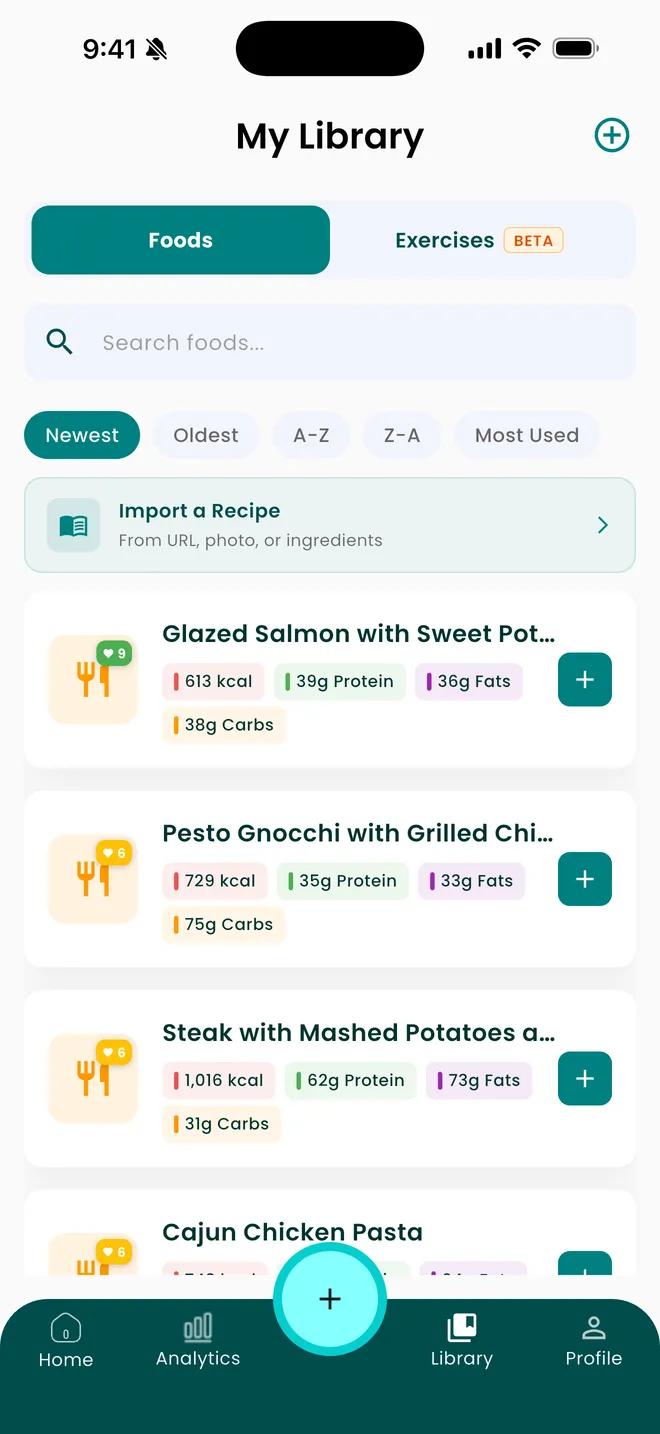
Save a meal once, log it in a tap forever after
Why Nutrify specifically
Built for this, not bolted on
Import from any cooking site
Paste a recipe link and Nutrify pulls the ingredient list automatically. No typing required.
Accurate per-serving macros
Set how many servings the recipe makes and your portion. Get accurate per-serving numbers, not just recipe totals.
Save and reuse
Recipes you import live in your library. Log them with one tap every time you cook that meal.


Three ways in, because recipes do not all live on websites
Nutrify imports from a URL, from a photo, or from the ingredients typed straight in. The URL route covers the ordinary case of a recipe you found online. The photo route covers the ones that were never digital: a page from a cookbook, a card in someone's handwriting, a printout stuck to the inside of a cupboard door. The manual route covers the recipes that only exist in your head, which for most people is the majority of what they actually cook. That last case is the one most recipe importers handle worst, treating manual entry as the fallback rather than the normal path, when in practice it is where the meals you eat most often come from.
The servings field decides everything downstream
A recipe total is a number nobody eats. Everything useful comes from dividing it, which makes the servings field the highest-leverage input on the screen and the one most often filled in carelessly. Two problems recur. Recipe authors are optimistic, and a dish written as serving six frequently serves four the way real people plate it. And servings are almost never equal, so the person who assembled the tray and the person served last are not eating the same portion. If you batch cook, the sturdier approach is to weigh the finished dish once and treat servings as portions of that weight, rather than trusting a number written by someone who has never seen your bowls.
Recipe text is ambiguous by design, so the ingredient list stays editable
Recipes are written to be cooked from, not parsed. "One large onion", "a knob of butter", "olive oil for frying" and "season to taste" are perfectly clear to a person and genuinely ambiguous to software. An importer has to make an assumption for each of these, and the honest thing is to show you what it assumed. In Nutrify every imported ingredient keeps its own line with its own quantity and macros, so you can correct the ones you know are wrong and leave the rest. The lines worth checking first are the fats and the largest carbohydrate, since those move the total far more than a herb or a spice ever will.
Cooking changes the dish, and the calculator does not see it
A recipe calculator adds up raw ingredients. What comes out of the oven is not the raw ingredients. Water evaporates, so a reduced sauce is the same calories in a smaller volume and a much denser spoonful. Frying oil partly stays in the pan and partly does not, and how much ends up in the food varies with the food. Roasting fat drains away from meat. None of this is a defect you can fix by choosing better software, and pursuing it is not worth the effort for home cooking. The correction that is worth making is including the cooking fat at all, since leaving it out is a consistent understatement that repeats every time you make the dish.
The import is the setup cost, the library is the return
Importing a recipe carefully takes a few minutes, which is only worth it because you never do it again for that dish. It goes into your library, keeps its per-serving breakdown, and becomes a one-tap log every subsequent time you cook it. Since most households rotate through a fairly small set of meals, a handful of well-imported recipes can cover a large share of the cooking you do all year. That is the actual argument for spending time on the import: not accuracy on Sunday's dinner, but never having to think about Sunday's dinner again.
What users say
Reviews from the App Store
I've been through at least 6 food trackers and this one is the keeper. Just started GLP-1, you find out really quickly that you need to track your nutrients, and this app tracks everything I need: protein, fiber, carbs, calories, weight progress. It specifically supports a GLP-1 diet nutrient focus (gives you the choice of several other diets too). The interface is super easy, take a photo of your food, the AI nutrients estimates are very accurate. And important for GLP-1 users, it lets you adjust your meal based on actual consumption ( because you know you can never finish your whole meal).
Nutrify has been such a huge part of me getting my life back on track. I'm on a weight‑loss and diabetes journey, and for many I felt like I didn't having any direction and hoping for the best. This app finally gave me something solid to hold onto. I LOVE the analytics! It actually helps me understand my food, my numbers, and my habits in a way that makes sense to me. I can see what's helping, what is not, and what I need to adjust without feeling judged or self-conscious about it.
I am an advanced user of intermittent fasting and have tried practically all serious applications of its kind. I tried Nutrify for a while and it seems to me that they have done an excellent job and a fairly complete vision of what the habits mean that we all seek to improve our nutrition. They are doing better than many veteran Apps like LoseIt and Cronometer!
FAQ
Recipe Import questions, answered
Add up the calories of every ingredient as it goes into the pot, including the cooking fat, then divide by the number of servings the dish genuinely produces. Nutrify does both steps for you once you import the recipe from a URL, a photo or a typed ingredient list and tell it how many servings it makes. Each ingredient stays editable, so you can correct any quantity that was read wrong.
Yes. Paste the recipe URL into Nutrify's import option and it pulls the ingredient list and builds the nutrition breakdown. You set the number of servings and your own portion, and the result is saved to your library for reuse. If a site does not import cleanly, the photo and manual ingredient routes cover the same ground with slightly more typing.
For a one-off, photograph the plate or describe it and correct the ingredient list. For anything you cook repeatedly, import it as a recipe instead. The recipe route costs more the first time and nothing afterwards, since the saved version logs with a single tap. It is also more accurate, because you are entering what actually went in rather than estimating from a finished plate.
Use how many portions you actually get, not the number printed on the recipe, which tends to be optimistic. The most reliable method for batch cooking is to weigh the finished dish once, then log by weight of the portion you take. Getting servings wrong scales every number in the recipe by the same factor, so it is the one field worth being fussy about.
Only if the oil is in the ingredient list. Recipes frequently say "oil for frying" without a quantity, and some omit it altogether, so it is the line most likely to be missing after an import. Add it with a realistic amount, because it is usually one of the largest contributors in the dish and the error repeats every time you cook it.
Yes. Imported recipes live in your library alongside your saved meals, holding their per-serving breakdown, so logging one again is a single tap with the portion already set. Since most people cook from a small rotation, importing ten or fifteen recipes properly tends to cover a large share of the meals you make all year.
Yes. The import option accepts a photo as well as a URL, which covers cookbooks, handwritten cards and printouts. The ingredient list it produces is editable line by line, so check the quantities against the page before you save it, particularly anything written as a description rather than a measurement.
Less accurate, and unavoidably so. A barcode returns a manufacturer's declared label. A recipe is a sum of estimates for ingredients whose exact weights you may not have measured, before any losses during cooking. It is still far better than guessing at the finished plate, and its real strength is consistency: the same saved recipe gives you the same number every time, so your week to week comparisons hold up.
And you also get
Recipe Import is one piece of it.
Every Nutrify user gets the full app: AI food recognition, analytics, health integrations, and everything below.
Meal Logging
Most food diary apps fail because logging a meal takes longer than eating it. Nutrify flips that: photo, voice, barcode, or text, your meal is logged before you put down your fork.
Ingredient Breakdown
Knowing your meal has 600 calories is one thing. Knowing it's the dressing, not the chicken, that's adding 300 of them, that's the information that actually changes what you order next time.
Grocery Shop Mode
Most nutrition decisions happen in the grocery store, not at the dinner table. Nutrify's Shop Mode lets you scan any product and see its full nutrition label before you commit to it.
Photo Food Journal
Numbers tell you what. Photos show you why. A visual food diary makes patterns obvious in a way that calorie totals never do, and logging it is as simple as taking the photo.
Health Score
Hitting your calorie target doesn't mean you're eating well. Nutrify's Health Score looks at your full diet (fiber, protein, sugar, micronutrients) and gives you an honest number.
Keep reading
Ready to try Recipe Import?
Free to download. Every feature free for 7 days, and you can cancel any time.